 Viktar Patotski ·
· Databases
· 21 min read
Viktar Patotski ·
· Databases
· 21 min read
Database Indexes That Actually Help (and the Ones Quietly Hurting You)
Most slow-query problems are not a missing index, they are the wrong index, or ten indexes nobody needs. Start from the query plan, build the index the query actually wants, and drop the ones taxing every write.
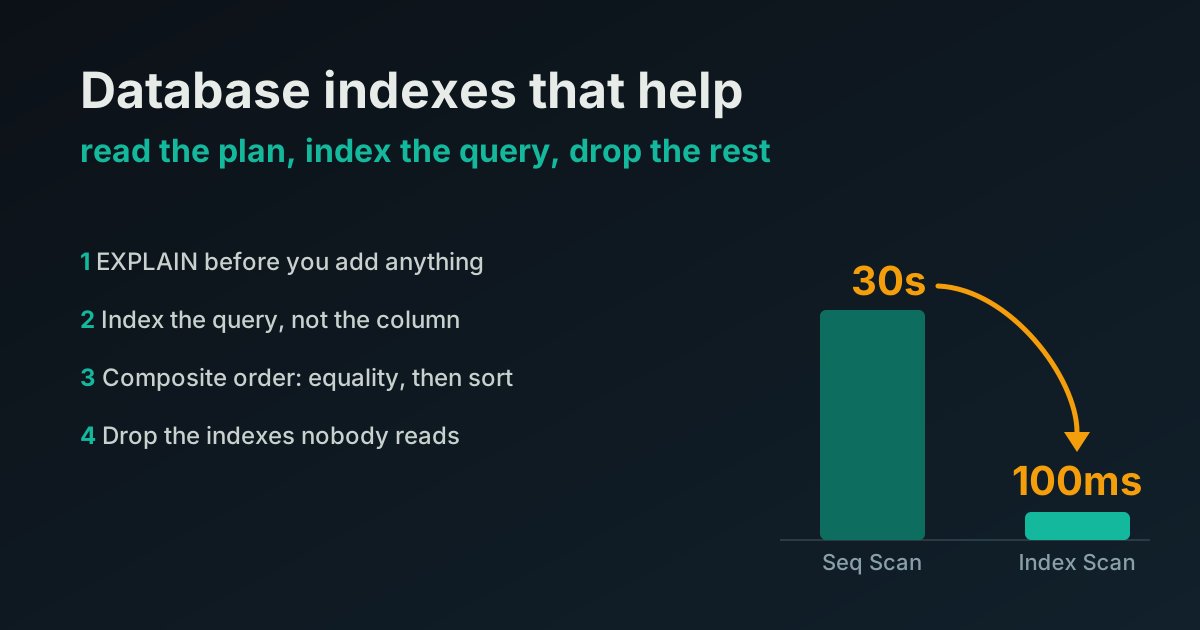
TL;DR - When a query gets slow, the reflex is to add an index. Sometimes that is right. Often the index already exists and the planner is ignoring it, or the index is on the wrong columns, or you have a dozen indexes slowing every write and none of them fit the query you actually run. The order that pays:
- Read the query plan first.
EXPLAIN ANALYZEtells you what the database is really doing.- Index for the query you run, not the column that looks important.
- On multi-column filters, the index is composite and column order decides how well it works.
- Drop the indexes nobody uses. Every one is write overhead and storage.
No rewrite. A slow query log,
EXPLAIN, and an afternoon.
Why indexes are the first place to look, and the first place to get it wrong
An index is the one performance lever almost everyone reaches for, because the story is simple: query slow, add index, query fast. And often it works on the first try, which is exactly why the habit sticks and the bad version of it spreads.
The bad version is adding an index per column “just in case,” indexing the column a human thinks is important rather than the one the query filters on, or adding a fresh index to a table that already has one the planner could use if the query were written differently. Each of those feels like progress. Each adds write cost to every insert and update, grows storage, wastes the memory it occupies once it gets cached, and leaves the slow query slow.
One scope note before the steps: every example and every benchmark here is Postgres, tested on version 18. The approach, read the plan, index the query you run, drop the dead weight, carries straight over to MySQL and other engines. The commands and the names for things do not.
Here is the order I actually work through it.
1. Read the query plan before you touch anything
You cannot fix what you have not measured, and for a query the measurement is the plan. In Postgres:
EXPLAIN (ANALYZE, BUFFERS) SELECT ...;Two words decide most of it. Seq Scan means the database is reading the whole table row by row. On a small table that is fine and often faster than an index. On a large hot table it is the problem. Index Scan (or Index Only Scan) means it found rows through an index. The job is usually turning a Seq Scan over a big table into an index scan, and then confirming the planner agrees by reading the plan again after.
Look at the actual rows versus the estimated rows too. If the planner expects 10 rows and gets 400,000, your statistics are stale and no index will save you until you ANALYZE the table. A wrong estimate is why a perfectly good index gets ignored.
Do this before adding anything. Half the time the index you were about to create already exists and the real fix is the query, the statistics, or a type mismatch in the WHERE clause that stops the planner using the index it has.
2. Index for the query, not for the column
The unit that gets indexed is not a column, it is a query pattern. Look at the WHERE, the JOIN, and the ORDER BY of the queries that run most, then index to serve those.
The number that matters is not how slow a query is once, it is slow times frequency. A query that runs 10,000 times an hour at 50ms costs the database far more than one that runs once a day at 2 seconds. Pull the top entries from pg_stat_statements by total time, not by mean time, and index those first.
SELECT query, calls, total_exec_time, mean_exec_time
FROM pg_stat_statements
ORDER BY total_exec_time DESC
LIMIT 20;
That list is your work queue. Everything else is guessing.
3. On multi-column filters, column order decides how much of the index you scan
This is the one that trips up most teams. When a query filters on more than one column, a single composite index beats two separate single-column indexes, and the order of columns in that composite index decides how well it works.
The rule: equality columns first, then the range or sort column. For a query like
SELECT * FROM orders
WHERE tenant_id = $1 AND status = $2
ORDER BY created_at DESC;
the index that serves the whole thing is:
CREATE INDEX ON orders (tenant_id, status, created_at DESC);tenant_id and status are equality matches so they lead. created_at is the sort, so it trails and the index can hand back rows already ordered, skipping the sort entirely. Flip the order, put created_at first, and the index still works but stops being efficient: modern Postgres scans it in date order and filters by tenant from inside the index, so there is no separate sort, but it can no longer seek straight to one tenant and walks far more entries to fill the same LIMIT. In a test that cost about 2x; the win is the clean seek the right order buys, not avoiding a catastrophe. Same three columns, different efficiency, purely from order.
Two separate indexes on tenant_id and status are worse than the one composite: the planner picks one, filters the rest by hand, and never gets the free ordering.
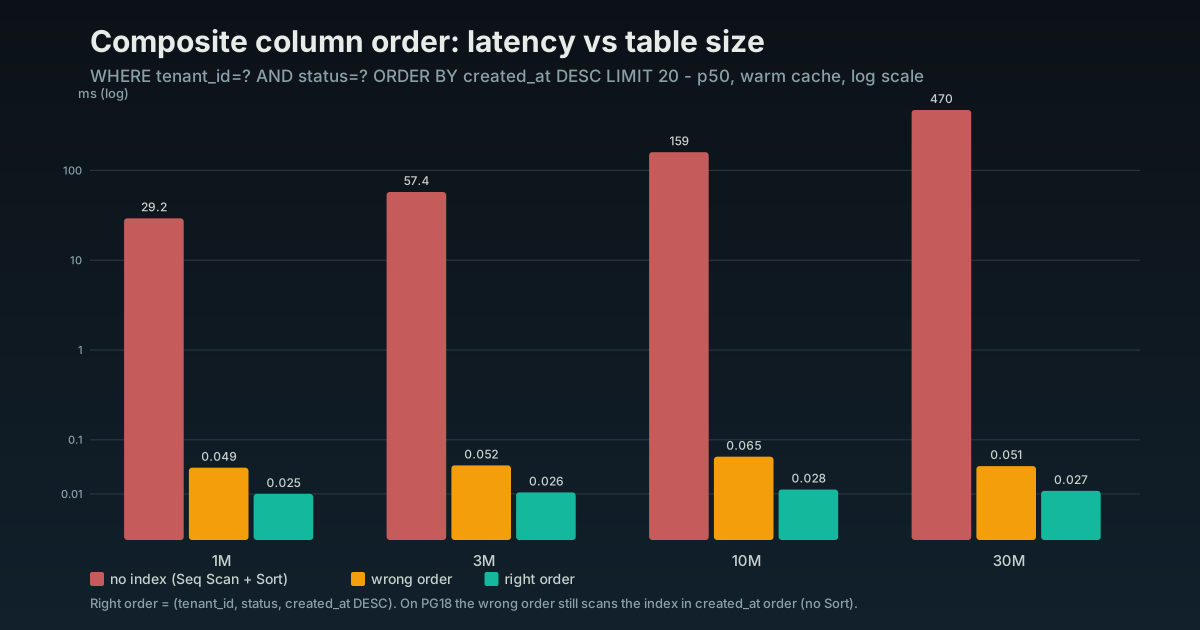
The gap that matters is right index versus no usable index, hundreds of milliseconds down to a fraction of one. The wrong column order is the smaller penalty: on PG18 the index is still used, just less efficiently.
4. Let the index answer the whole query
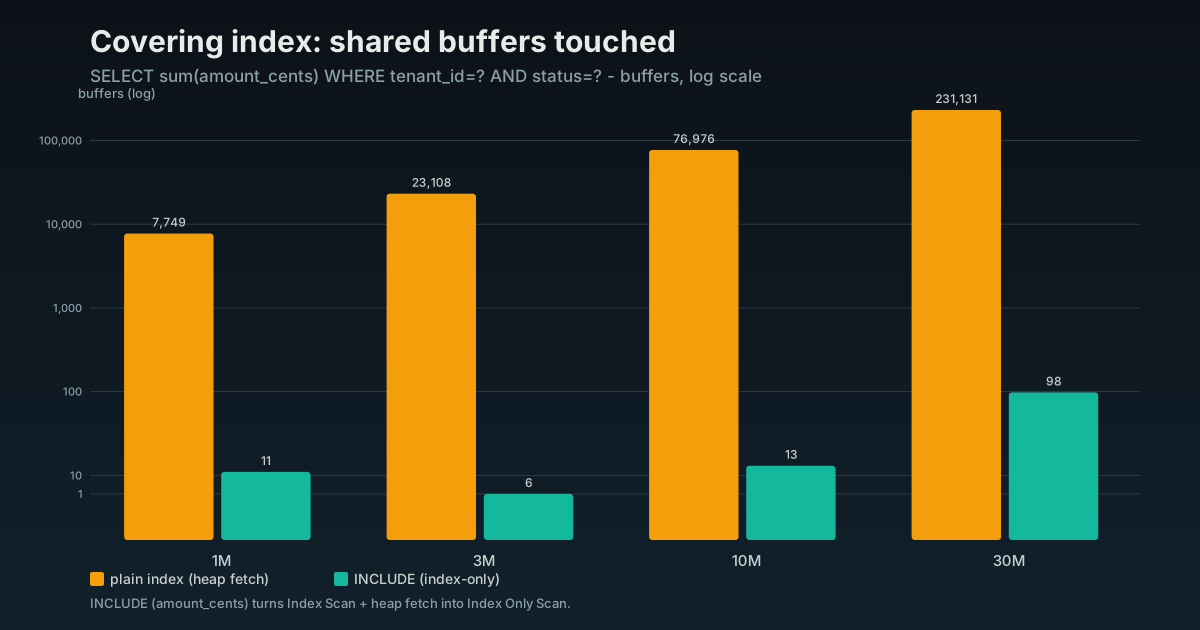
If a query only needs a few columns, an index that contains all of them lets the database answer from the index alone and never touch the table. That is an Index Only Scan, and on a hot read path it is a real step down in latency.
In Postgres you add the extra columns with INCLUDE so they ride along without being part of the search key:
CREATE INDEX ON orders (tenant_id, status) INCLUDE (total_amount, created_at);Now a query that filters on tenant and status and returns those two amounts never reads the heap. You pay for it in index size, so reserve covering indexes for the read paths that matter, not every query.
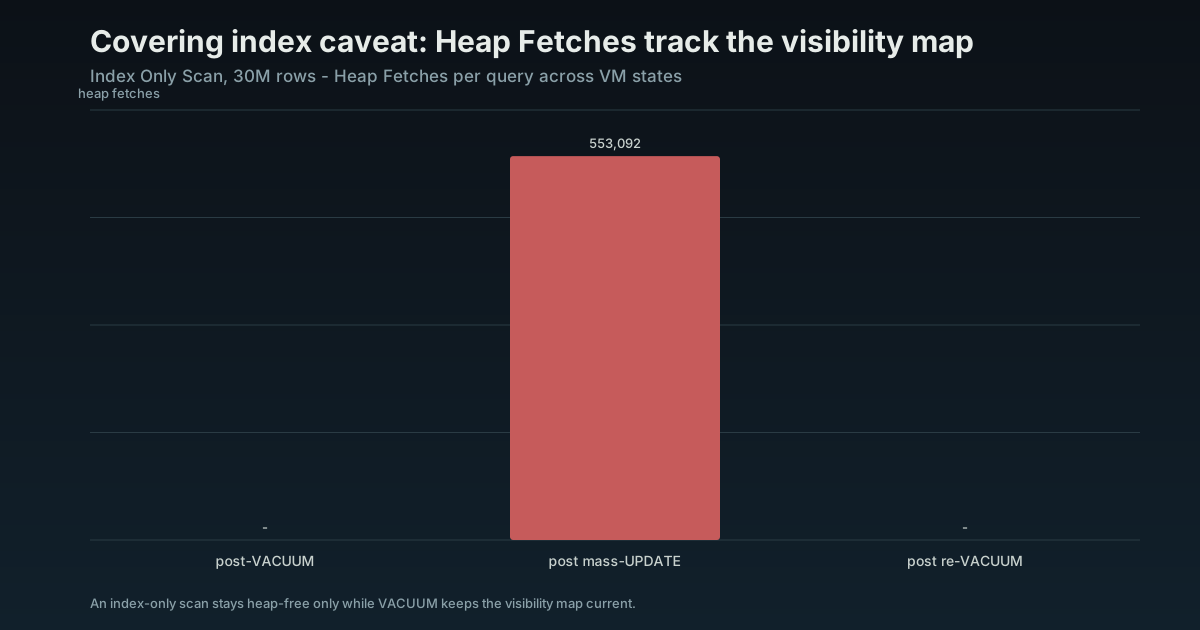
One caveat that catches people: an index-only scan only stays index-only if the table is vacuumed. Postgres checks whether a row is visible to your transaction through a per-page map that VACUUM maintains, and on a heavily updated table that map goes stale, so the scan quietly starts fetching heap pages again to check visibility. If a covering index is not paying off the way the plan promised, the table usually needs vacuuming more often, not a different index.
5. B-tree is the default, not the only kind
Everything so far assumes a B-tree, which is the right answer for the large majority of queries: equality, ranges, sorting, prefix matches. Two other types matter once a column stops being a plain scalar.
GIN is for columns that pack many values into one row: jsonb, arrays, and full-text search. A B-tree cannot index “rows whose jsonb contains this key”; a GIN index can, and it is the difference between a search that returns instantly and one that scans every row.
CREATE INDEX ON documents USING gin (payload jsonb_path_ops);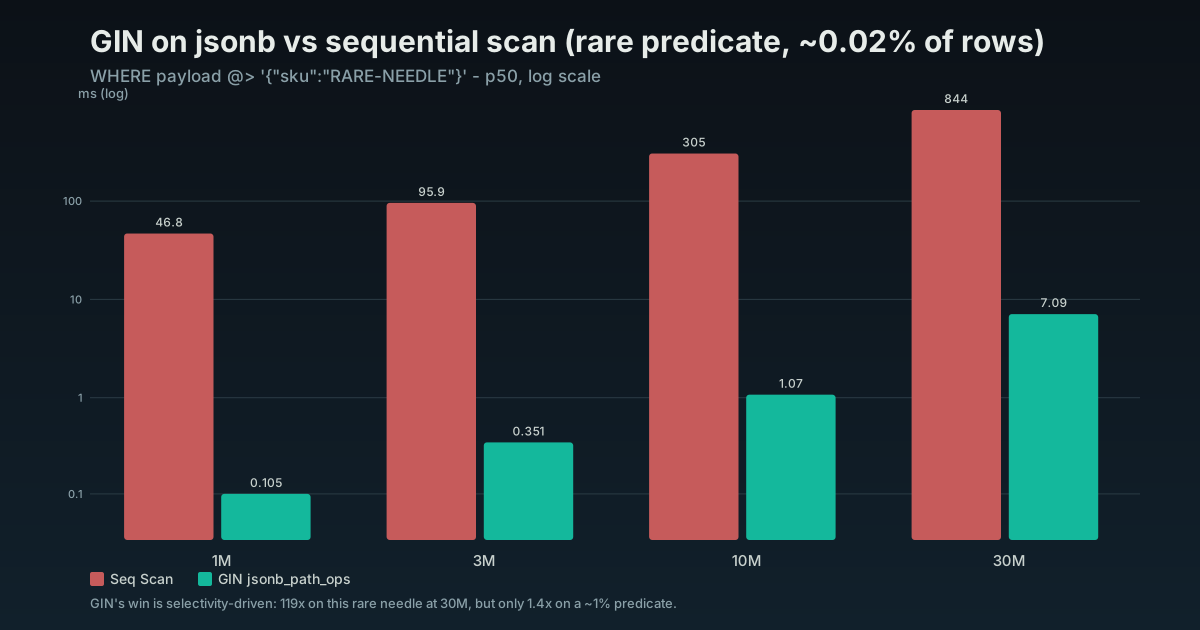
How big that win is depends on selectivity. For a rare value it is over a hundred times faster, as above. For a value that matches roughly one percent of rows it narrows to about 1.4x against a warm parallel seq scan, so GIN earns its place on the selective lookups, not the common ones.
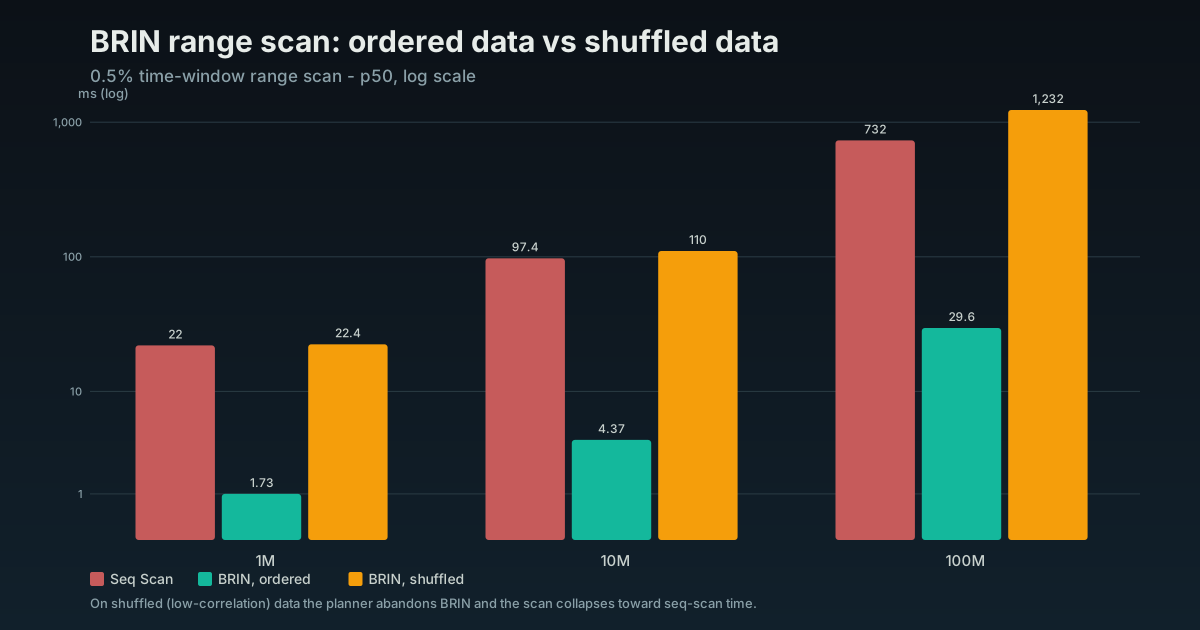
BRIN is for very large tables whose rows are already roughly ordered on disk, the classic case being an append-only events or metrics table ordered by time. Instead of indexing every row it stores the min and max per block range, so the index is tiny, hundreds of KB where a B-tree would be gigabytes. It only works when physical order matches the column and is close to useless on randomly inserted data, so it is a narrow tool, but on the right table the saving is enormous.
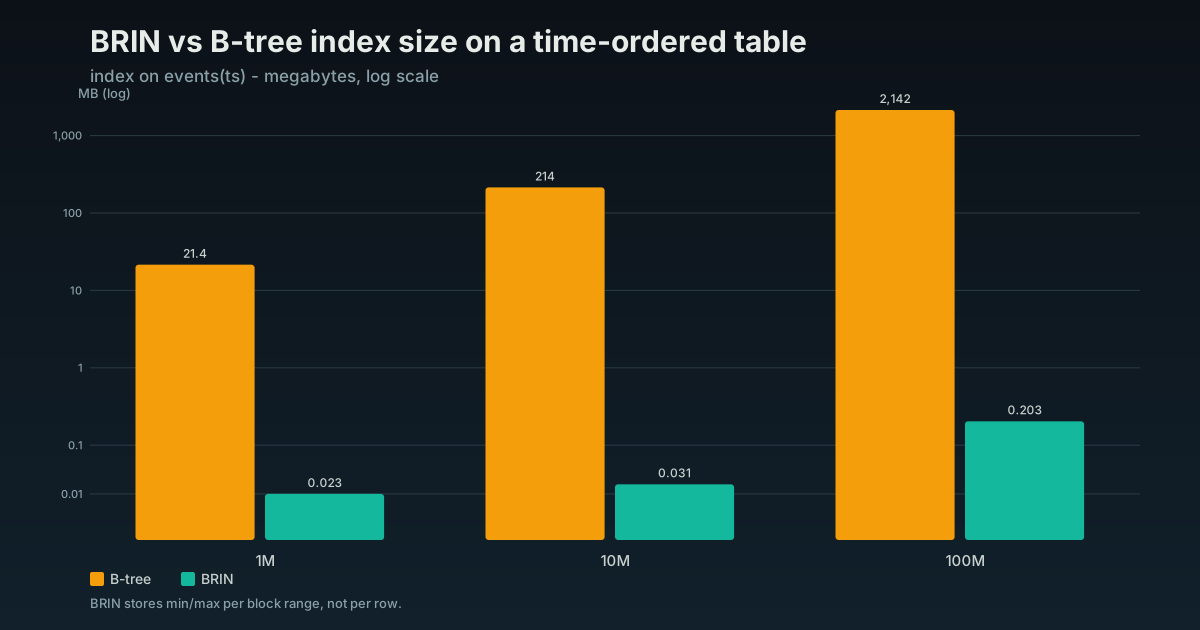
The trade is speed for size. On a wide range scan the BRIN is a little slower than the B-tree, not faster, but it is a rounding error of the size and still far ahead of a sequential scan. That only holds while the data stays in physical order. Shuffle the same rows and the planner abandons the BRIN, and the scan collapses back toward seq-scan time.
Postgres ships three more: Hash does equality only and rarely beats a B-tree, so it stays a curiosity. GiST backs geometric data, range types, and exclusion constraints (PostGIS leans on it). SP-GiST handles the irregular shapes, IP ranges and text-radix trees. You can run a SaaS for years without hand-picking any of the three.
You will reach for B-tree almost always. Knowing GIN exists is what saves you the day a jsonb filter or a substring search is scanning your biggest table.
6. The type of the indexed column decides how big the index is
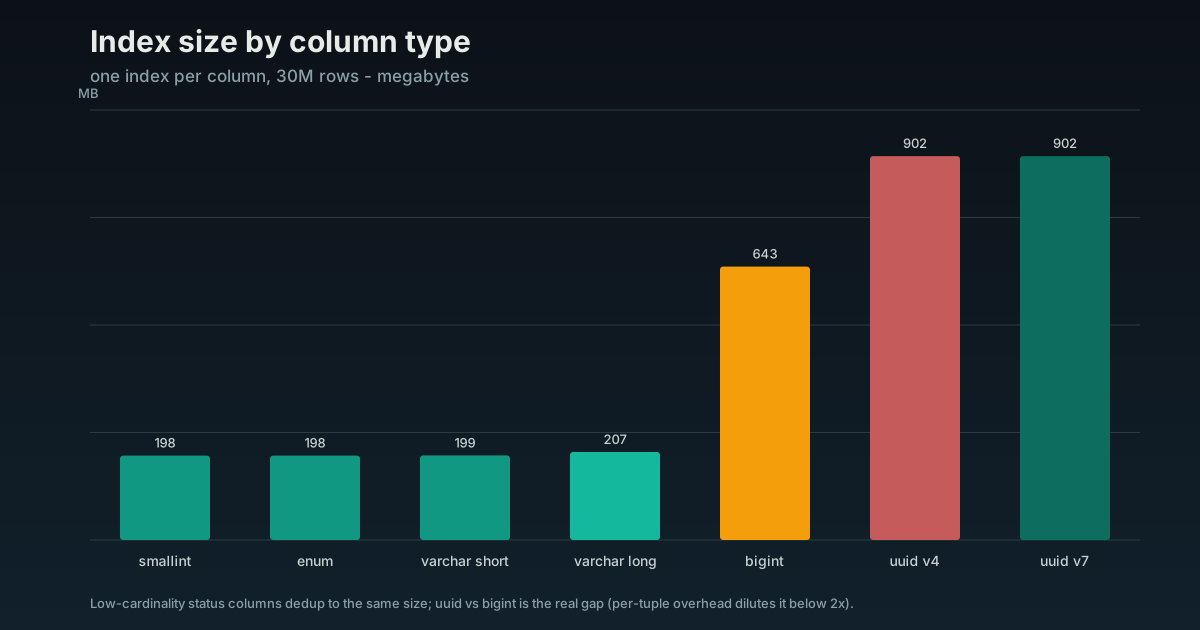
An index stores the indexed value, so the width of the column type is the width of every entry in the index. A narrower type means a smaller index, and a smaller index means more of it stays in memory, which is most of why indexes are fast in the first place. Type choice is an index-size decision, not just a modeling one.
The clearest case is a low-cardinality column like status. As a Postgres enum it is stored as a 4-byte value, fixed, no matter how long the label reads. As varchar it stores the full string plus a length byte on every row: active is 7 bytes, pending_review is 15, and the index grows with the text. A smallint status code is narrower still at 2 bytes. So enum or smallint beats varchar on index size, and the gap widens the longer your labels get.
One honest caveat so you do not over-tune: a B-tree entry carries an 8-byte header and rounds up to an 8-byte boundary. A 4-byte enum and a 6-character varchar both land in the same 16-byte slot once you add the header and alignment, so for very short labels the saving rounds away. The difference shows up with longer values and millions of rows, not on a tiny lookup table.
Where type choice actually moves the number is keys, because you index and reference them everywhere. A uuid is 16 bytes; a bigint is 8. Pick uuid for a primary key and every secondary index and every foreign-key index that points at it gets bigger. Per-page and per-entry overhead dilute the raw 2x width, so in a 30M-row test the uuid index measured about 1.4x the bigint one (946 MB against 674 MB), not double, but that is still 40% more bytes on the largest tables you have. The sharper cost is on inserts: random uuid v4 keys scatter writes across the index and loaded about 4x slower than sequential bigint keys. That dwarfs any enum-versus-varchar decision. The rule is the same either way: index the narrowest type that honestly fits the data, and care most about it on the columns you index the most.
7. Why you added an index and nothing got faster
This is the most common indexing question I get: someone added the index, the query is still slow, and the plan still says Seq Scan. The index is being ignored, and there is a short list of reasons, all worth knowing because the fix is rarely a bigger index.
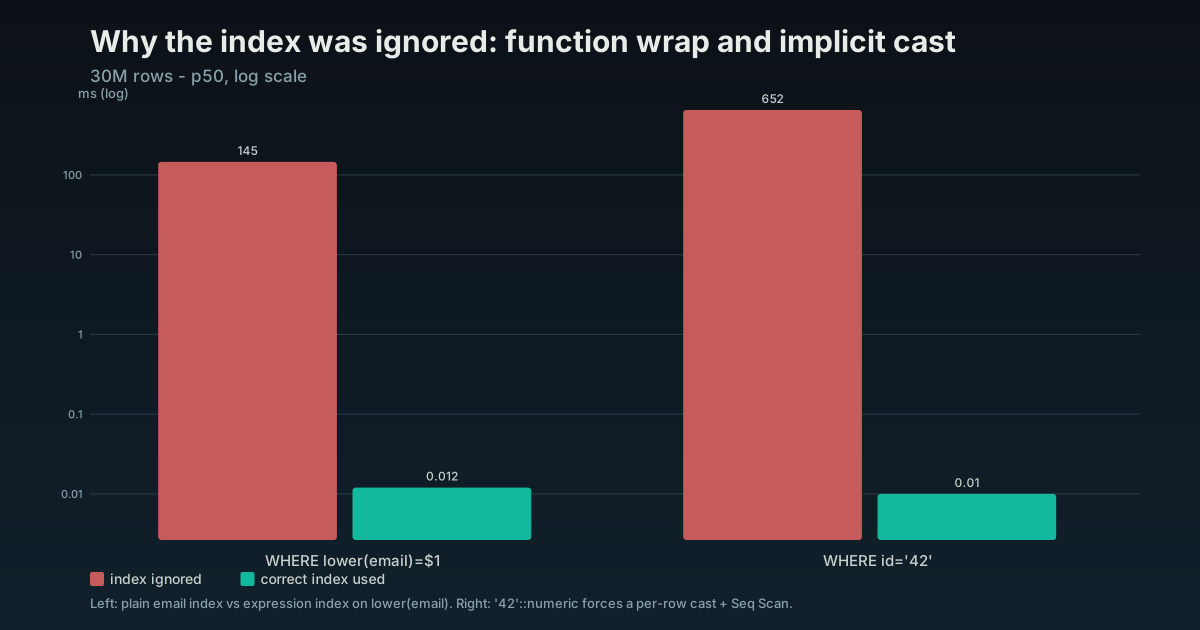
A function on the column. WHERE lower(email) = $1 cannot use a plain index on email, because the index stores email, not lower(email). Either stop wrapping the column, or index the expression you actually query:
CREATE INDEX ON users (lower(email));An implicit type cast. Compare a bigint column to a quoted literal, WHERE id = '42', and Postgres may have to cast every row to make the types line up, which throws the index away. Pass the value as the column’s real type and the index comes back.
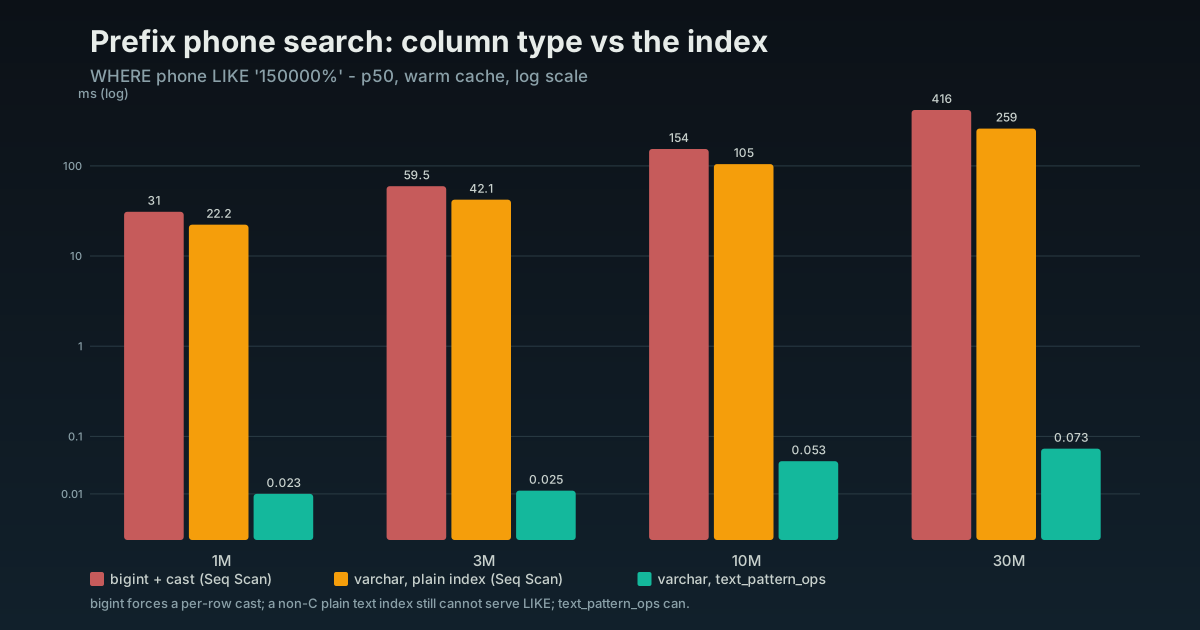
This one has a war story. On one project an internal tool let the operations team find a customer by typing the first digits of a phone number, phone LIKE '1234566%', and each lookup took about 30 seconds. The phone was stored as a bigint. Two things were wrong at once: LIKE is a text operator, so every row’s number had to be cast to text first, and a B-tree on a bigint is ordered numerically, not by digit string, so it could not serve a prefix search anyway. The planner did the only thing left to it and scanned the whole table, casting every row.
Storing the phone as text fixes the first problem but not automatically the second, and here it depends on your collation. Under a C or C.UTF-8 collation, byte order is prefix order, so a plain text index serves LIKE 'prefix%' already and you are done. Under any other collation, the glibc en_US.UTF-8 and ICU locales that managed Postgres ships by default on RDS, Cloud SQL, Aurora, and Supabase, a plain text index still cannot serve the prefix match, because the collation does not order strings the way a prefix reads them. There you need the text_pattern_ops operator class (which indexes byte-wise regardless of the column collation):
CREATE INDEX ON customers (phone text_pattern_ops);In a 30M-row reproduction the bigint version seq-scanned at about 415 ms warm, and far longer cold and unparallelized, which is what the operations team actually felt. Switching to text but keeping a plain index under a non-C collation still seq-scanned, about 260 ms. The text_pattern_ops index answered from an index-only scan in under 0.1 ms.
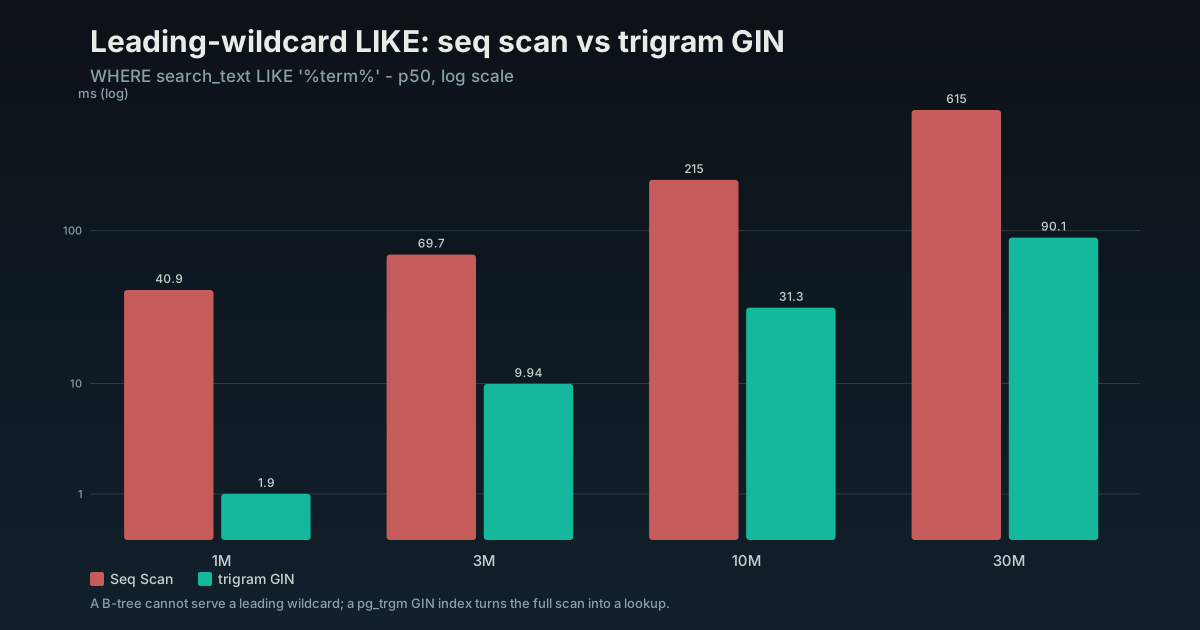
A leading wildcard. LIKE 'smith%' can use a B-tree. LIKE '%smith%' cannot, because a B-tree is ordered left to right and a match that starts in the middle of the string has nothing to seek to. Substring and case-insensitive search need a trigram index:
CREATE EXTENSION pg_trgm;
CREATE INDEX ON customers USING gin (name gin_trgm_ops);
That turns ILIKE '%smith%' from a full scan into an index lookup. On a cold cache that is the difference between many seconds and a handful of milliseconds. Even fully warmed, where the sequential scan gets every advantage, a 30M-row test still dropped from about 615 ms to 90 ms, and the gap widens as the table grows.
Low selectivity. An index on a column with three values, an active flag say, often will not be used on its own, and correctly so: if the value matches 40% of the table, reading the index and then jumping around the heap is slower than one clean scan. Index low-cardinality columns as part of a composite, after a selective column, or as a partial index, not alone.
When in doubt the answer is section 1: read the plan. EXPLAIN tells you whether the index was used, and the reason it was not is almost always one of these four.
8. Index your foreign keys, because Postgres will not
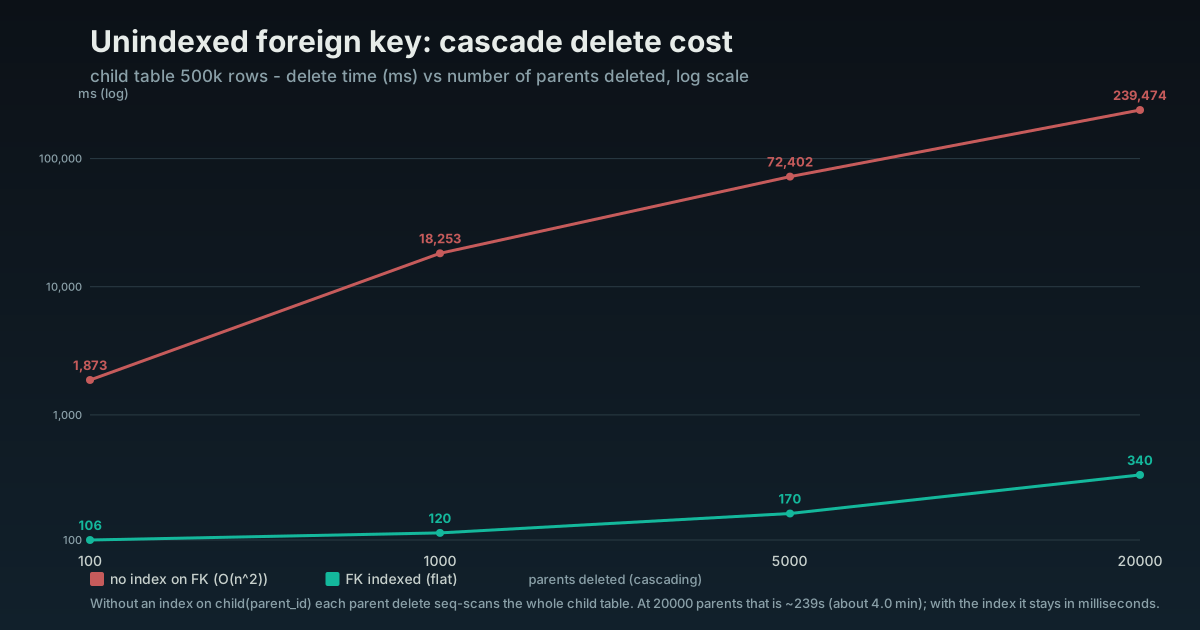
This is the single most common missing index I find in real schemas. Postgres indexes primary keys and unique constraints for you, automatically. It does not index the other side of a foreign key, the referencing column, and almost everyone assumes it does.
Two things go slow without it. Joins from the child table back to the parent have no index to use. And every delete or update on the parent has to scan the whole child table to check the constraint. Put ON DELETE CASCADE on an unindexed foreign key and a single parent delete becomes a sequential scan of the child table, holding locks while it runs. Delete a batch and you have an accidental quadratic.
The fix is one line per foreign key:
CREATE INDEX ON orders (customer_id);Grep your schema for foreign keys and check each one has an index. This is free performance, almost always sitting unclaimed.
9. The indexes that are quietly hurting you
Every index speeds up some reads and taxes every write. People feel the read win on day one and never measure the write cost, so it compounds quietly until the writes themselves are the problem.
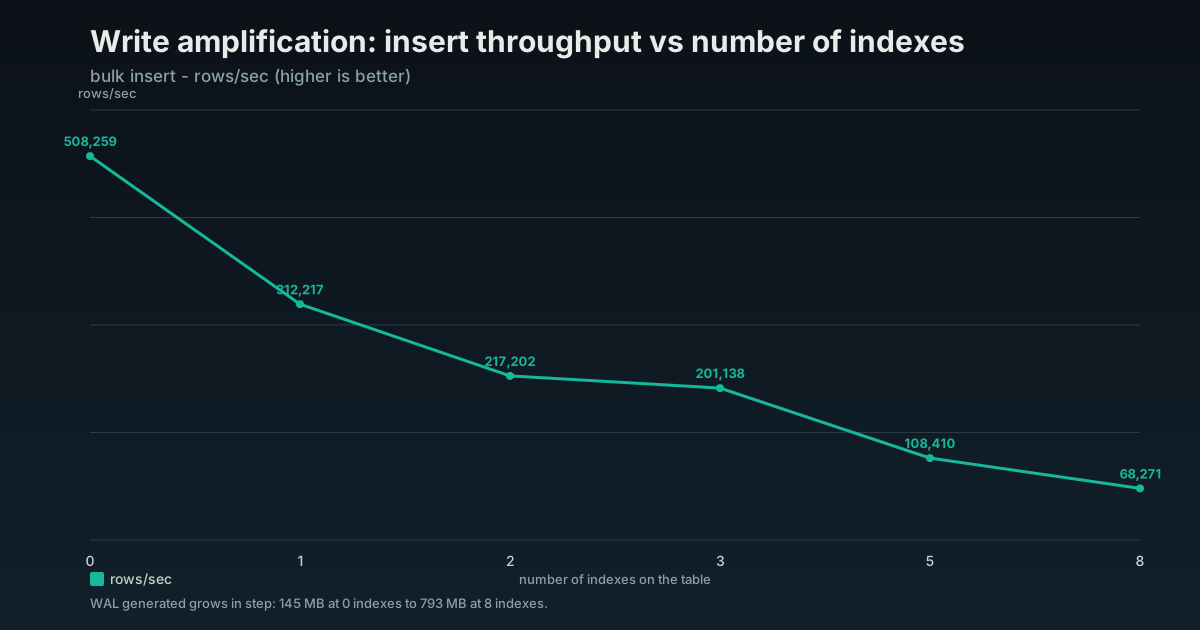
The tax is bigger than most people guess. Bulk-inserting into the same table, each index I added dropped throughput close to linearly: five indexes ran about 4.7x slower than the unindexed table, 108,000 rows per second against 508,000, eight indexes about 7.4x, and the write-ahead log grew from 146MB to 793MB across the same range. Every extra index is another structure each insert has to find its place in, and another stretch of WAL to write and replicate.
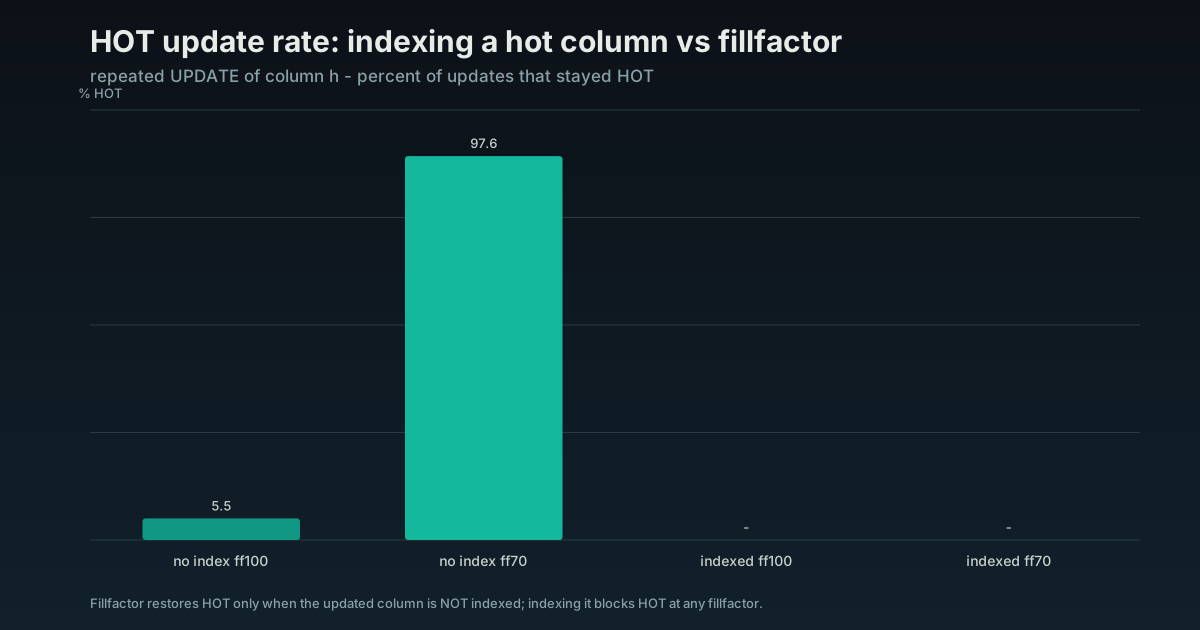
Updates carry a second, quieter cost. Postgres can usually update a row in place without touching any index, a HOT (Heap-Only Tuple, the row stays on its page) update, but only while the update changes no indexed column. Put an index on a column that changes on every update, an updated_at or a hit counter, and you switch HOT off for the whole row: now every update rewrites every index on the table. In a test, an update-heavy column held about 98% HOT updates while unindexed and dropped to 0% the moment that column was indexed, at any fillfactor. If you only need the column for retrieval, keep it out of the key and put it in an INCLUDE clause instead.
So on a write-heavy table the cleanup is worth as much as any index you add:
-
Unused indexes. Postgres tracks how often each index is read. Anything with near-zero scans on a table that gets queried is dead weight. Find them:
SELECT relname, indexrelname, idx_scan FROM pg_stat_user_indexes WHERE idx_scan < 50 ORDER BY idx_scan; -
Redundant indexes. An index on
(tenant_id)is fully covered by an index on(tenant_id, status). The narrower one is redundant and can go. Duplicate indexes (same columns, created twice under different names) happen more than you would think. -
Over-indexed write tables. A queue or events table that is mostly inserts wants the minimum number of indexes that serve its reads, not one per column anyone ever filtered on.
Dropping an unused index is one of the safest performance wins there is: it can only help writes, and if reads were not using it, reads do not notice.
10. Building and rebuilding indexes without locking production
One operational point, because the failure mode here is an outage, not a slow query. A plain CREATE INDEX takes a lock that blocks every write to the table until the build finishes. On a small table that is a blink. On a large production table it is minutes of failed writes, a partial outage you caused on purpose.
Build indexes on live tables with CONCURRENTLY:
CREATE INDEX CONCURRENTLY ON orders (customer_id);It builds without blocking reads or writes. It is slower, it cannot run inside a transaction, and there is one catch: if a concurrent build fails partway it leaves behind an INVALID index that does nothing but still costs you on every write. Find and drop those:
SELECT indexrelid::regclass FROM pg_index WHERE NOT indisvalid;
DROP INDEX CONCURRENTLY <name>;
Maintenance is the same story. Indexes bloat over time as updates and deletes leave dead entries that VACUUM marks reusable but does not compact, so a busy index slowly grows and slows. When one has grown well past the size its row count justifies, REINDEX INDEX CONCURRENTLY rebuilds it without locking out writes. Do it when the bloat is real, not on a calendar.
11. Partial indexes for the hot slice
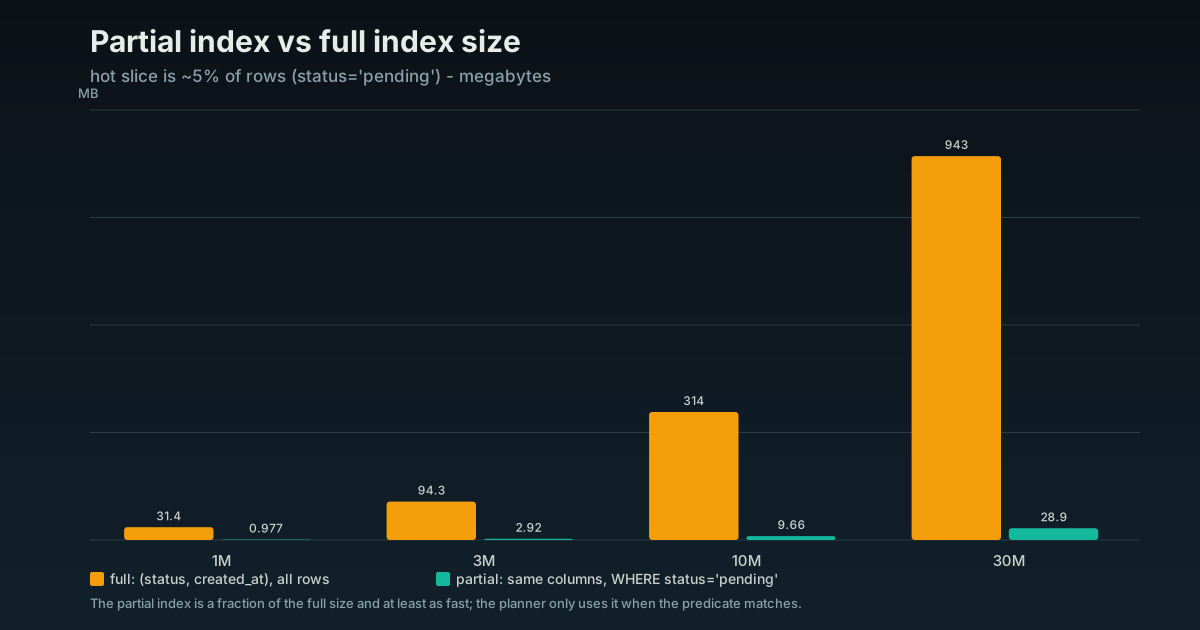
When queries only ever care about a slice of the table, index only that slice. A partial index is smaller, faster to scan, and cheaper to maintain.
CREATE INDEX ON jobs (created_at) WHERE status = 'pending';If the workers only ever look at pending jobs and 95% of the table is done, this index is a fraction of the size of a full one and the maintenance cost only applies to the rows that match. Common fits: soft-deleted rows (WHERE deleted_at IS NULL), active records, recent time windows.
What this looks like in practice
A common shape: the slowest endpoint behind an app’s starting screen sits at 30 seconds, and the team is already pricing a bigger database instance to make it go away. EXPLAIN ends that conversation in a minute. A Seq Scan over a multi-million-row table, running on every load of the screen everyone hits first. The table is not missing indexes. It has several. Not one of them leads with the column the query filters on, so the planner ignores every one and reads the whole table on each call.
One composite index, in the order the query actually needs, can take that endpoint from 30 seconds to around 100 milliseconds. No bigger instance, no application change beyond the migration. The same pass drops the indexes nothing reads off the hottest write table, handing the writes back the headroom those dead indexes were taxing.
The lesson is not “indexes are good.” It is that a table can carry several indexes and not one of them fits the query that is hurting, and nobody has read the plan to notice. The measuring is the work. The fix is one line.
Summary
Indexes are the first thing to reach for and the easiest to get wrong. Read the plan before you add anything. Index the query patterns that run most, by total time not worst case. On multi-column filters the index is composite and column order is the difference between a direct seek and scanning far more of the index than you need. Keep the indexed columns narrow, since the type width is the index width and a smaller index stays in memory. Then drop the indexes nobody reads, because every one is taxing every write. Measure first, index narrowly, delete the dead weight.
Every number and chart in this post comes from a benchmark you can run yourself. The full suite, the schema, the queries, and the scripts that generated these charts, is open source: github.com/xp-vit/db-performance-benchmarks.
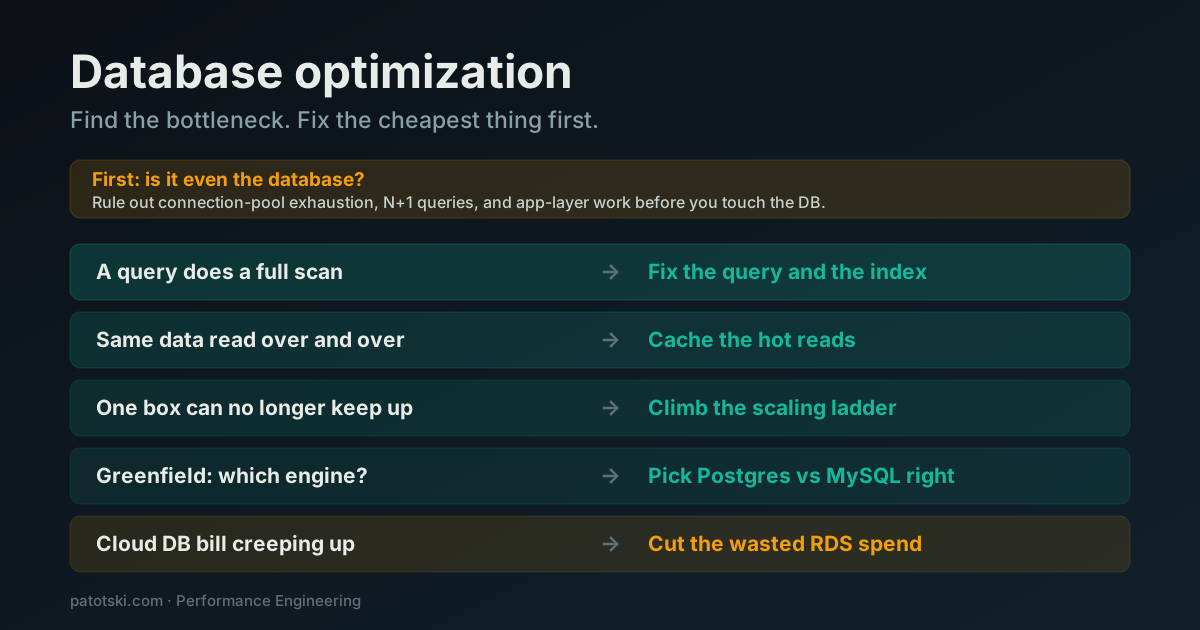
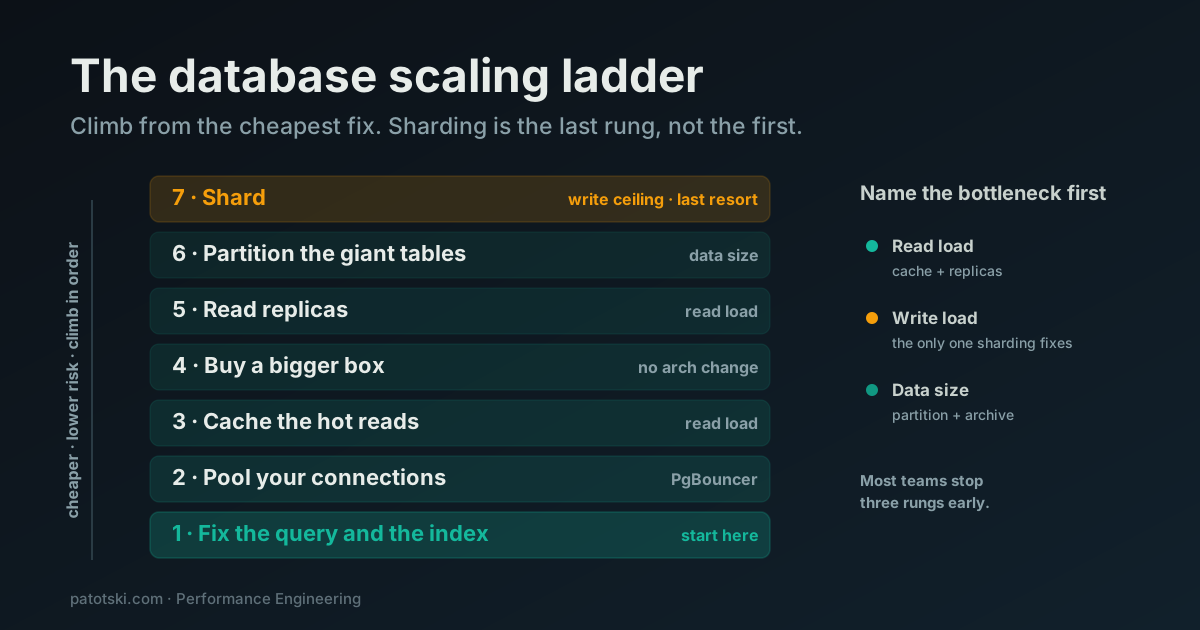
Indexing is the first fix to reach for, but it is one piece of a larger method. If you are not yet sure this is your bottleneck, start with database optimization: find the bottleneck, fix the cheapest thing first.
Slow queries you have not had time to chase down? I do this as part of Performance Engineering. Book a free 30-minute call and I will read the plans with you.