 Viktar Patotski ·
· Databases
· 11 min read
Viktar Patotski ·
· Databases
· 11 min read
Database Optimization: Find the Bottleneck, Fix the Cheapest Thing First
Most database optimization guides hand you a list of ten techniques and skip the one question that matters: which problem do you actually have? Here is the diagnosis-first version. Find the real bottleneck, then apply the cheapest fix that clears it.
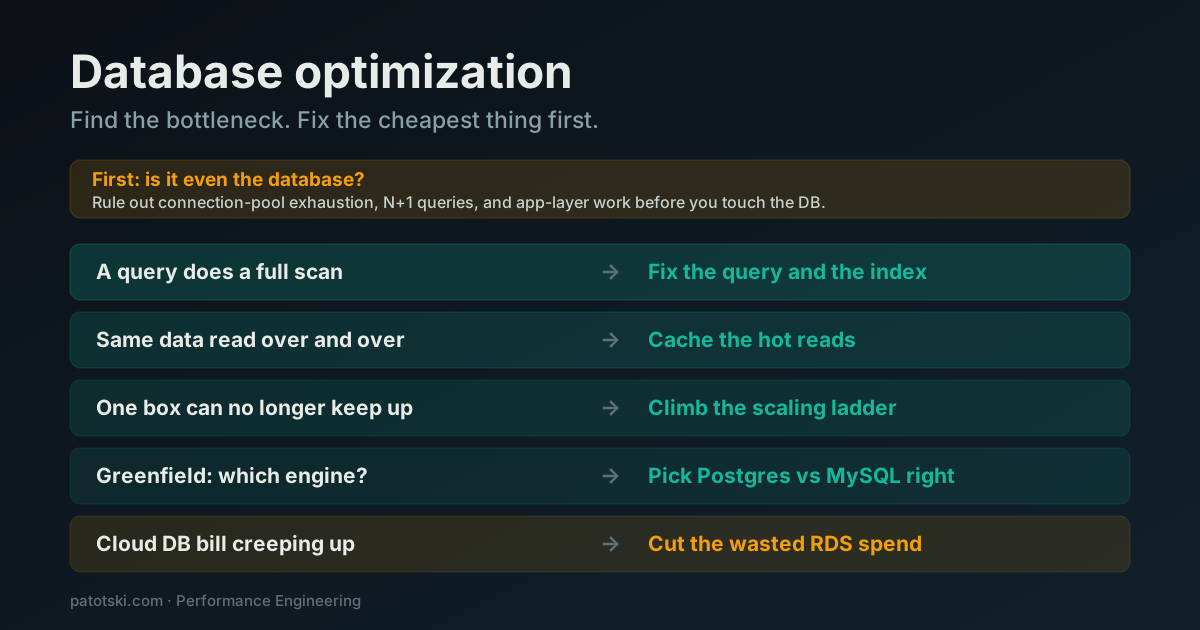
TL;DR - Database optimization is a diagnosis problem, not a checklist. Before you reach for any technique, work out which thing is actually slow: a single bad query, repeated reads of the same data, one machine running out of room, the wrong engine, or a cloud bill that grew while nobody watched. Then apply the cheapest fix that clears it. The order, from cheapest to last resort: rule out the application layer, fix the query and the index, cache the hot reads, climb the scaling ladder, and only rethink the engine or the spend once the obvious wins are gone. Most “we need to scale the database” projects end two rungs earlier than the team feared.
Search “database optimization” and you get the same article fifteen times: a numbered list of ten techniques. Add indexes. Use caching. Partition. Shard. Pool your connections. Normalize, then denormalize. Every list is correct and every list is useless, because it hands you a full toolbox and never tells you which tool your problem needs.
That is the part that actually matters. A missing index and a runaway cloud bill are both “database optimization,” and the fix for one does nothing for the other. Reaching for the wrong technique is how teams spend a quarter sharding a database that just needed one index, or bolt on a cache that makes the app slower.
So this is the diagnosis-first version. Most database performance tuning advice skips straight to the techniques; the goal here is to help you find which of a small number of problems you actually have, then point you at the cheapest fix that clears it. The fastest way to improve database performance is aiming the right technique at the right problem, not running the whole list. Each fix has a deep dive of its own, linked as we go.
First, is it even the database?
The most expensive mistake in database optimization is optimizing the database when the database was never the problem. A large share of “the database is slow” reports turn out to be the application layer wearing the database as a costume. Before you touch a query plan, rule three things out.
Connection pool exhaustion. This is the silent one. Your database sits at twenty-five percent CPU, memory is fine, disk is calm, and yet every request is slow. The reason is that requests are queuing in the application waiting for a free connection, and the database never sees the wait because the work has not reached it yet. Every database metric looks healthy while users stare at spinners. If response times are bad but the database itself looks bored, check your pool size and your connection lifetime before anything else.
N+1 queries. An ORM loads a list of one hundred orders, then issues one more query per order to fetch the customer. In development with ten rows it is invisible. In production with five hundred concurrent users it is tens of thousands of tiny queries hammering the database for data you could have fetched in one join. The database is not slow. It is being asked to do a thousand times more work than it should.
Plain application work. Serialization, JSON encoding, an N-squared loop over a result set, a synchronous call to a third party inside the request. None of this is the database, and none of it gets faster when you add an index.
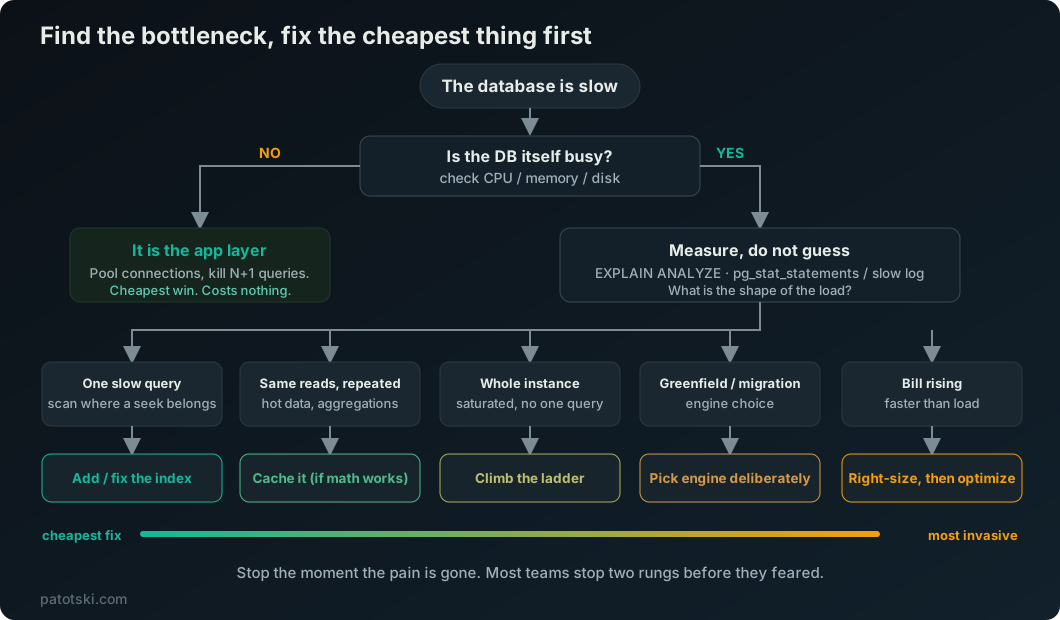
The check is simple. Look at the database’s own load. If CPU, memory, and disk are calm while the app is slow, the bottleneck is above the database, not inside it. Fix that first. It is almost always the cheapest win available, and it costs nothing but reading your own metrics.
Measure, do not guess
Once you have confirmed the database really is working hard, the next rule is to measure before you change anything. Guessing is how indexes that help nobody get added and how the wrong subsystem gets rewritten.
Three tools end most of the guessing:
EXPLAIN ANALYZEon the slow query. It shows what the planner actually did, not what you assume it did: a sequential scan where you expected an index, a row estimate that is off by three orders of magnitude, a nested loop that should have been a hash join. This is the single most useful skill in database work, and most of the SERP never mentions it.pg_stat_statements(Postgres) or the Performance Schema statement digests (MySQL,sys.statement_analysisorperformance_schema.events_statements_summary_by_digest). These rank queries by total time spent, which is what you actually care about. The MySQL slow query log is no substitute: it is off by default, only logs queries slower thanlong_query_time(10 seconds by default), and needs a tool likept-query-digestto rank anything. A query that takes 50ms but runs ten thousand times an hour costs more than a 3-second report that runs twice a day. Optimize by total load, not by worst single case.- The shape of the load. Group what you find into one of a few buckets: is the pain from reading data, from writing data, from the sheer size of the data, or from a handful of specific queries? That bucket tells you which fix applies.
With the application ruled out and the load measured, you are no longer optimizing a vague feeling. You have a named bottleneck. Now you can pick the cheapest fix.
The five problems, and the cheapest fix for each
Almost every real database problem is one of five. Here is each one, how to recognize it, and the cheapest fix, with a full walkthrough linked for each.
A query does too much work
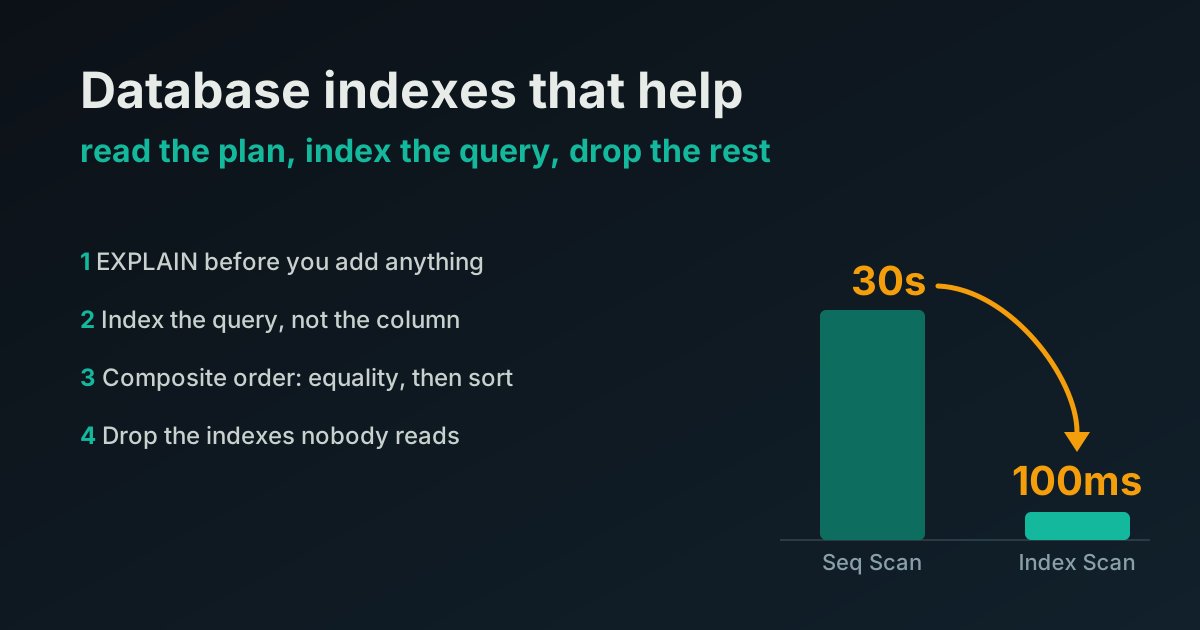
The symptom is a specific query that is slow on its own, and EXPLAIN ANALYZE shows a scan where there should be a seek. The fix is rarely more hardware. It is query optimization in the literal sense: the right index, or a rewrite so the query can use an index you already have. A missing index turns a millisecond lookup into a multi-second scan, and no bigger box hides that for long. This is the first fix to try because it costs nothing but attention and it often erases the whole problem.
The trap is the opposite extreme: indexes are not free. Every index is paid on every write, so a table drowning in indexes nobody queries looks like a write problem when the real fix is dropping the dead weight.
Full method, including how to read the plan and which indexes to drop: the database indexes that actually help.
The same data gets read over and over
The symptom is read load: the same rows, the same expensive aggregation, served again and again to dashboards and list pages. The fix is to compute it once and reuse the result, which is caching. Done right it takes the load off the database entirely.
Done wrong it makes things worse. A cache that sits across a network can answer slower than the query it was meant to replace, once you pay for the round trip and the serialization on both ends. Whether a cache helps depends on how expensive the underlying work is and how far away the cache lives. That is a decision, not a default.
The decision, with measured numbers for local versus distributed caching: Redis caching vs a local cache.
One machine can no longer keep up
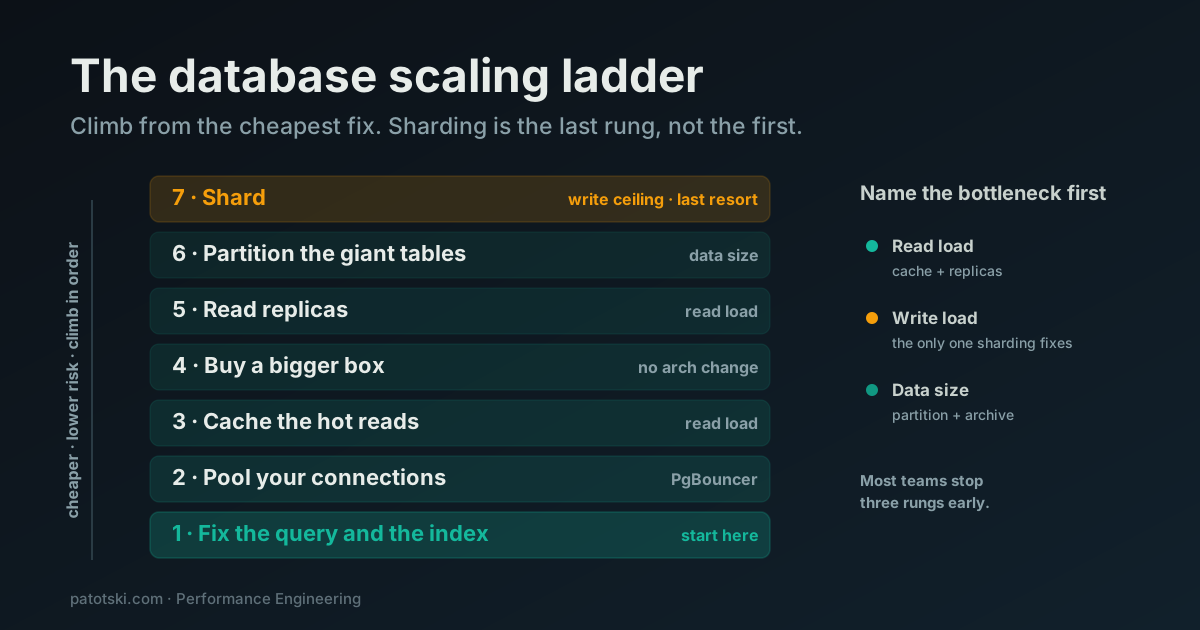
The symptom is that no single query is the problem; the whole instance is saturated. This is where teams panic and reach for sharding, and it is almost always too early. There is a ladder of cheaper, lower-risk fixes between “one box is full” and “split the data across machines,” and the right rung depends on whether the pressure is read load, write load, or data size.
Sharding is the last rung, not the first. Connection pooling, caching, a bigger box, read replicas, and partitioning all come before it, and most teams stop climbing well short of sharding.
The full ladder, from cheapest fix to last resort: the database scaling ladder.
You are about to pick the wrong engine
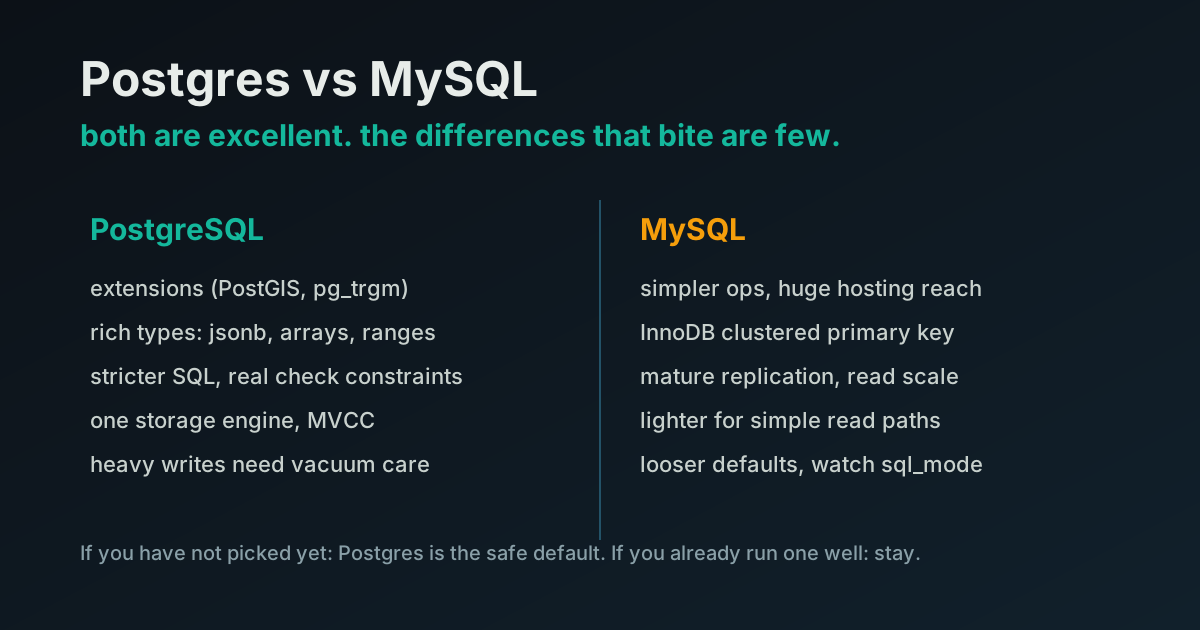
This one is for greenfield work, or a team weighing a migration. The symptom is a choice, not a slowdown: Postgres or MySQL, and a lot of confident internet advice that does not match your workload. Picking wrong here is an optimization decision you make once and pay for over years.
For most SaaS the honest answer is that either engine is fine and the differences that matter are narrower than the comparison posts suggest. But there are real differences, and a few of them will matter to you specifically.
Where each one actually wins, and when a switch is worth it: Postgres vs MySQL for a SaaS.
The cloud bill grew while nobody watched
The last problem is not latency at all. It is cost. An unoptimized database on a managed cloud service quietly bills you for the inefficiency: an oversized instance bought to paper over a missing index, replicas added to absorb load that caching would have killed, storage and I/O nobody is tracking. Every performance fix above is also a cost fix, because a database doing less work needs less hardware to run.
The cost angle is the one the rest of the database-optimization internet ignores entirely, and it is often where the optimization pays for itself.
How to find and cut the waste on managed databases: reduce your AWS RDS costs.
The expensive mistakes
Three patterns show up again and again, and each one is a case of reaching for a heavy tool before diagnosing the problem.
Sharding too early. Sharding is the most invasive, least reversible change you can make to a data layer, and it only addresses a genuine write ceiling, which is the rarest of the bottlenecks. The common failure is sharding on the wrong key: split by one column, then discover most queries filter by another, so every read fans out across every shard and the system ends up slower than the single box you started with. The rollback costs more than the build. Climb the ladder first.
The cache that slowed things down. Adding a cache feels like progress, so teams add one without measuring. If the cached value is cheap to recompute and the cache lives across a network, you can pay more to fetch and deserialize it than you saved. Measure the actual cost of the work before you decide a cache is worth its round trip.
The bigger-box reflex. Scaling the instance is the fastest fix to deploy and the easiest to justify, so it becomes the answer to everything. It is a legitimate rung, and sometimes buying a bigger box for a year is the honest, cheap move. But used as a reflex it just raises the bill while the missing index that caused the problem stays missing. A bigger box hides a bad query; it does not fix it.
The thread through all three: the cheapest fix is usually not the most satisfying one, and the most satisfying one is usually too big.
The order: cheapest fix first
Put together, the whole method is a single ordered checklist. Work top to bottom and stop the moment the pain is gone.
| Symptom you see | Likely bottleneck | Cheapest fix | Deep dive | |
|---|---|---|---|---|
| 1 | DB looks idle, app is slow | Application layer | Pool connections, kill N+1 | this page |
| 2 | One query is slow, plan shows a scan | A query doing too much | Add or fix the index | Indexes that help |
| 3 | Same reads, expensive aggregations | Read load on hot data | Cache it (if the math works) | Redis vs local cache |
| 4 | Whole instance saturated | Outgrowing one machine | Climb the ladder, not straight to sharding | The scaling ladder |
| 5 | Greenfield or migration | Engine fit | Choose Postgres vs MySQL deliberately | Postgres vs MySQL |
| 6 | Bill rising faster than load | Paying for inefficiency | Right-size, then optimize the work | Cut RDS costs |
Notice that the fixes get more expensive and more invasive as you go down, and the cheapest one at the top is the one most teams skip.
Where to go next
Database optimization is not a pile of techniques to apply at random. It is a short diagnosis followed by the cheapest fix that fits:
- Rule out the application layer first (this page).
- A slow query usually wants the right index.
- Repeated reads usually want a cache, if the math works.
- A saturated instance wants the scaling ladder, not sharding.
- A new project wants the right engine from the start.
- A growing bill wants the cost pass.
Find the bottleneck, fix the cheapest thing first, and stop as soon as the pain is gone.
Staring at a slow database and not sure which of these it is? Book a free 30-minute call and I will help you find the real bottleneck before you spend a quarter on the wrong fix.