 Viktar Patotski ·
· Databases
· 14 min read
Viktar Patotski ·
· Databases
· 14 min read
The Database Scaling Ladder: Every Cheaper Fix Before You Shard
Most teams reach for sharding years before they need it. There is a ladder of cheaper, lower-risk fixes that comes first, and the right rung depends on which bottleneck you actually have: read load, write load, or data size. Here is the ladder, from cheapest to last resort.
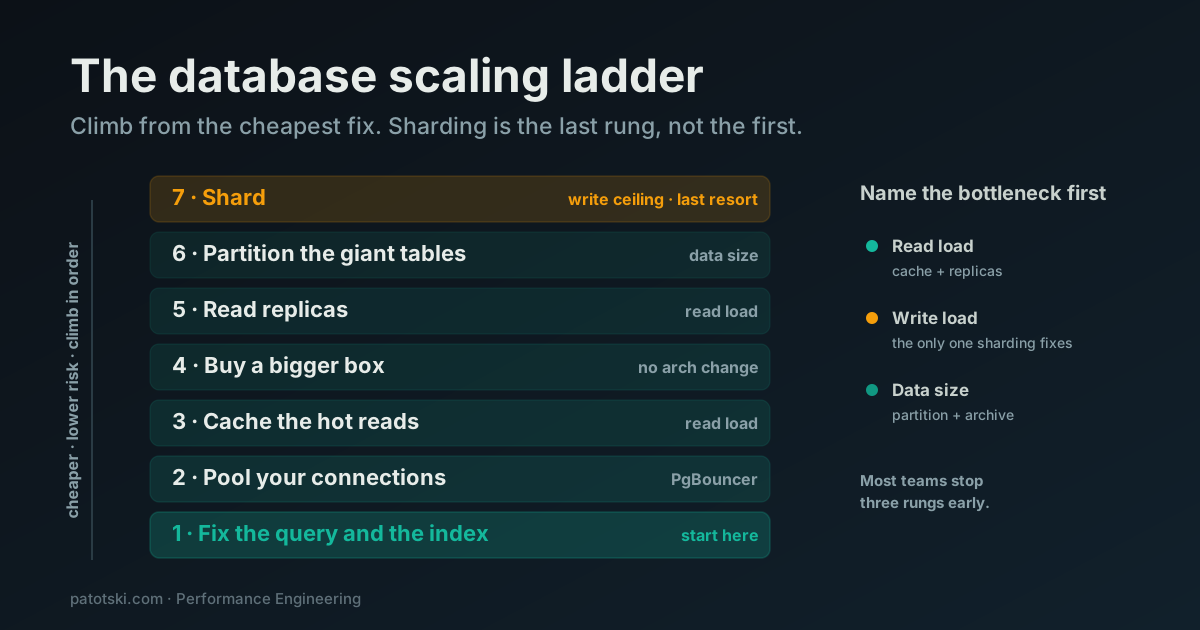
TL;DR - Sharding is the last rung of the ladder, not the first. Before you split your data across machines, work out which of three things actually hurts: read load, write load, or data size. Then climb from the cheapest fix up: fix the query and the index, pool your connections, cache the hot reads, buy a bigger box, add read replicas, partition the giant tables, and only then shard. Most teams stop climbing three rungs earlier than they feared.
When a database starts to hurt, “we need to shard” is the conclusion teams jump to fastest and regret most. Sharding splits your data across independent machines, and it is the single most expensive, most invasive, hardest-to-reverse change you can make to a data layer. It is also, for most vertical SaaS, completely unnecessary for years longer than people assume.
There is a ladder between “the database is slow” and “we have to shard.” Each rung is cheaper and lower risk than the one above it. The trick is to climb in order and stop the moment the pain goes away.
First, name the bottleneck
You cannot pick the right fix until you know what is actually saturating. Almost every database scaling problem is one of three:
- Read load. Too many queries reading data. The CPU is busy serving SELECTs, the same rows get read over and over, dashboards and list pages pile on.
- Write load. Too many inserts and updates. This is the one sharding actually addresses, and it is the rarest of the three in a normal SaaS. Before you believe it, count your indexes: every index is paid on every write, so an over-indexed hot table looks like a write ceiling when the real fix is dropping indexes nobody queries.
- Data size. Tables so large that indexes no longer fit in memory and maintenance (vacuum, backups, index builds) gets painful, even though query and write rates are fine.
These have different cures. Read load is cured by caching and replicas. Data size is cured by partitioning and archival. Only a genuine write ceiling needs sharding. If you treat all three as “scale the database,” you will reach for the heaviest tool every time. So measure first: look at CPU, at the slow-query log, at table and index sizes, at replication lag if you already have a replica. Find which of the three is the constraint, then climb.
The ladder
Rung 1: Fix the query and the index
The cheapest scaling fix is making the database do less work per query. A missing or wrong index turns a millisecond seek into a multi-second scan, and no amount of hardware hides that for long. This is rung one because it costs nothing but your attention and it often erases the entire problem.
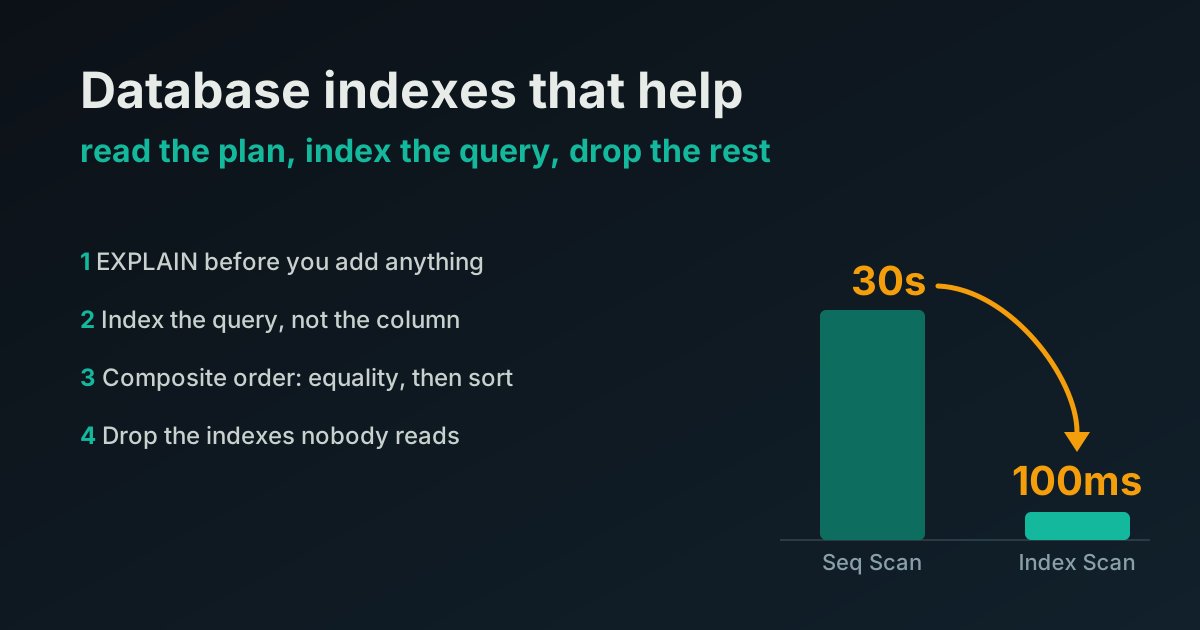
I wrote the whole method up separately: the indexes that actually help, how to read the plan, and how to drop the indexes that are quietly taxing every write. Start there. A surprising number of “we need to scale” conversations end at this rung.
Rung 2: Pool your connections
If you have fixed the queries and the database is still under pressure, look at how many connections you are opening before you blame the database itself.
PostgreSQL uses one operating-system process per connection, and the default max_connections is 100 (docs). Each backend process carries real overhead, and the Postgres project’s own guidance is blunt: throughput climbs with connections until the server saturates, then falls off, because the extra connections only add context switching, lock contention and cache-line contention (Postgres wiki). A serverless app or a fleet of workers that each opens its own connections will exhaust that budget long before the database runs out of CPU.
Note that this is a different pool from the one inside your app. A connection pool like HikariCP in Spring Boot, or the ActiveRecord pool in Rails, reuses connections within a single process so you skip the handshake on every query. That helps, but it does not fan in: twenty app instances with a pool of ten each still open two hundred connections, and a fleet of app pools is exactly what exhausts max_connections in the first place. A server-side pooler solves the across-process problem the app pool cannot.
The fix is a pooler. PgBouncer sits in front of Postgres and hands a small set of real database connections out to a large set of clients. It has three modes (docs):
- Session pooling: a server connection is tied to a client until the client disconnects. Safe, least efficient.
- Transaction pooling: the server connection is returned to the pool after each transaction. This is the mode that buys you real fan-in, and the one most people want.
- Statement pooling: returned after every statement. Most aggressive, and it forbids multi-statement transactions.
Transaction pooling is where the leverage is, but it changes the rules. Anything that relies on session state across transactions can break: SET, LISTEN/NOTIFY, WITH HOLD cursors, session-level advisory locks, and historically prepared statements (docs). PgBouncer 1.21 added protocol-level prepared-statement support in transaction mode via max_prepared_statements, so that last one is no longer the blocker it used to be (FAQ).
How big should the pool be? The Postgres wiki’s rule of thumb for active connections is (core_count * 2) + effective_spindle_count, where the spindle term is 0 when the working set fits in RAM, and core count excludes hyperthreads (wiki). That number is far smaller than most people guess. A pooler in front of a modest pool will quietly absorb a connection storm that looked like a scaling crisis.
One more thing worth knowing: PostgreSQL 14 reworked snapshot visibility so that having many connections, including many idle ones, costs far less than it used to (release notes). If you are on an old major version, upgrading is itself a scaling move.
Rung 3: Cache the hot reads
If the bottleneck is read load, the same data being read over and over, the next rung is a cache. Serve the repeated reads from memory and the database only sees the misses.
The real decision is where the cache lives: in your application’s own memory, or in a shared service like Redis. That choice has its own tradeoffs, and getting it wrong gives you stale data across instances. I worked through it with benchmarks in Redis caching vs a local in-memory cache. For the ladder, the point is simply: caching is the cure for read load, and it sits below every hardware and topology change because it is cheaper than all of them.
Rung 4: Buy a bigger box
This rung gets skipped out of pride, and it should not. Vertical scaling, moving to an instance with more CPU and more RAM, is the only rung that requires no architectural change at all. No new failure modes, no application changes, no consistency tradeoffs. You pay more money and you get more headroom.
It is not glamorous and it does have a ceiling: eventually you run out of bigger instances, and the price stops being linear. But it is almost always cheaper than the engineering time the distributed rungs cost, and it buys you months to do the harder work calmly instead of in a fire. If a larger instance makes the pain go away for a year, that is often the correct answer, not a failure of nerve. Climb the architectural rungs because you have a reason, not because asking for a bigger box felt like cheating.
Rung 5: Add read replicas
Once a single primary cannot serve the read volume and a bigger box is not enough, replicas are the next rung, and they target read load specifically.
PostgreSQL streaming replication sends the write-ahead log from the primary to one or more hot standbys over TCP. It is asynchronous by default, the typical delay is well under a second, and there is no write penalty on the primary (docs). A hot standby (hot_standby = on, the default) serves read-only queries while it replays the log, so you can send reporting, dashboards, and list views to replicas and reserve the primary for writes.
Two things bite people here.
First, replicas scale reads, not writes. Every write still lands on the primary and then replays on every replica. If your bottleneck is write load, replicas make it slightly worse, not better. This is the rung where naming the bottleneck pays off.
Second, asynchronous replicas serve stale data. Because the standby is behind the primary by some lag, a user who writes a row and immediately reads it from a replica can see the old value. This read-your-writes problem has no built-in fix; Postgres explicitly documents that you must route a read that depends on a just-completed write back to the primary (docs). And Postgres does not route queries for you. There is no built-in read/write splitter; your application or a proxy like Pgpool-II decides what goes where (docs).
If you genuinely cannot tolerate any loss on failover, you can run synchronous replication via synchronous_commit = remote_apply and synchronous_standby_names, at the cost of write latency, since the primary now waits for a standby to confirm (docs). Most teams keep async and handle the consistency edge cases in the app.
Rung 6: Partition the giant tables
If the bottleneck is data size rather than query rate, one or two enormous tables, partitioning is the rung, and it is commonly confused with sharding. They are not the same. Partitioning keeps all the data in one PostgreSQL instance on one machine. It just splits one logical table into many physical pieces.
PostgreSQL has had declarative partitioning since version 10, with RANGE, LIST, and HASH strategies (HASH arrived in 11) (docs). The main win is partition pruning: when a query’s WHERE clause lines up with the partition key, the planner skips every partition that cannot match, so a query against a billion-row table only touches the relevant slice. The other win is data lifecycle: dropping last year’s data is an instant DETACH or DROP of a partition instead of a slow, bloat-generating DELETE across the whole table. Maintenance also gets cheaper, since vacuum and index builds run per partition.
There is one gotcha that catches everyone: a primary key or unique constraint on a partitioned table must include all of the partition key columns (docs). If you partition orders by created_at, your primary key can no longer be id alone; it has to be (id, created_at). Plan the key before you partition, not after.
Partitioning is not free and it is not infinite. The planner handles up to a few thousand partitions well when queries prune to a small subset, but too many partitions inflate planning time and memory (docs). The Postgres docs put the rule of thumb plainly: partitioning starts to pay off once a table is bigger than the server’s memory. Below that, an index is usually enough. And to be clear about the ceiling: partitioning is still one instance. When that one machine cannot hold the write throughput or the total data, you have reached the top of this rung.
Rung 7: Shard, as a last resort
Sharding is horizontal partitioning across multiple independent machines. Each shard is its own database holding a subset of the rows, keyed by a shard key. This is the rung that actually raises the write ceiling, because writes now spread across machines instead of funneling into one primary. It is also where the real cost lives.
The two mature options:
- Citus, a PostgreSQL extension (open source under AGPLv3, also sold as Azure Cosmos DB for PostgreSQL). You pick a distribution column as the shard key, a coordinator node routes queries to worker nodes, and co-location keeps rows that share a distribution value on the same machine (docs).
- Vitess, the MySQL sharding layer that grew out of YouTube in 2010 and graduated from the CNCF in 2019 (CNCF). VTGate routes queries and vindexes map column values to shards.
Why it is the last rung: cross-shard joins and aggregations are slow because they shuffle data between machines, distributed transactions carry the cost of two-phase commit, every query ideally has to carry the shard key, and resharding a live system is genuinely hard. You do not have to take my word for the difficulty. Read how Figma’s databases team lived to tell the scale (2024) or Shopify on balancing shards at terabyte scale (2021). These are some of the strongest engineering teams in the industry, and sharding still cost them years and custom infrastructure.
If you are a multi-tenant SaaS and you do reach this rung, there is one decision that makes it survivable: shard by tenant_id (or org_id). Keeping a tenant’s data co-located on a single shard means almost every query, which is already scoped to one tenant, stays on one machine and avoids the cross-shard penalty entirely (Citus docs). A multi-tenant app is, conveniently, the easiest kind of system to shard well.
Three things to reach for before sharding, not instead of climbing
These do not slot neatly onto the ladder, but each can buy a rung’s worth of headroom:
- Materialized views and read models. If the read pain is heavy aggregation (reports, rollups), precompute it. Postgres has
REFRESH MATERIALIZED VIEW CONCURRENTLY(since 9.4, requires a unique index) so you can refresh without locking readers (docs). - Archive cold data. Most tables are mostly history. Moving rows older than N months to cold storage shrinks the hot set, which makes indexes fit in memory again and can undo a “data size” problem without partitioning at all.
- Queue the writes. If write spikes are the issue, putting an async queue in front of non-urgent writes smooths the load so the database sees a steady rate instead of bursts.
What this looks like in practice
The pattern I see most: a team convinced they need to shard, with a roadmap and a quarter blocked out for it. We measure first. The bottleneck turns out to be read load, not write load, driven by a handful of unindexed dashboard queries hammering the primary. Rung one (fix the indexes) and rung three (cache the hot reads) take it from “on fire” to “comfortable,” and a bigger instance buys the rest of the year. The sharding project, the riskiest thing they were about to do, comes off the roadmap entirely. That is the normal outcome, not the lucky one.
Sharding is real and sometimes necessary. But it earns its place at the top of the ladder by being the thing you do when every cheaper rung is exhausted and the write ceiling is genuinely the wall in front of you. For most vertical SaaS, that wall is much further away than it looks from the bottom.
Decision checklist
- What is saturating: read load, write load, or data size? Do not pick a fix before you can answer this.
- Have you read the query plans and fixed the indexes? Rung one ends most of these conversations.
- Are you opening too many connections? Put PgBouncer in transaction mode before you blame the database.
- Is the same data read repeatedly? Cache it before you add machines.
- Would a bigger instance buy a year? Then buy it, and do the hard work calmly.
- Read load specifically? Replicas, and handle read-your-writes by routing fresh reads to the primary.
- One or two tables too big to maintain? Partition them, and set the primary key to include the partition column first.
- A true write ceiling, with every cheaper rung exhausted? Now shard, by
tenant_idif you are multi-tenant.
Summary
There is a long ladder between a slow database and a sharded one, and almost everyone tries to jump straight to the top. Name the bottleneck first: read load, write load, or data size. Then climb from the cheapest fix. Fix the query and the index, pool the connections, cache the hot reads, buy a bigger box, add read replicas for read load, partition the tables that have outgrown memory, and shard only when a real write ceiling is the last wall standing. Each rung is cheaper and safer than the one above it, and most teams find the pain disappears long before the top.
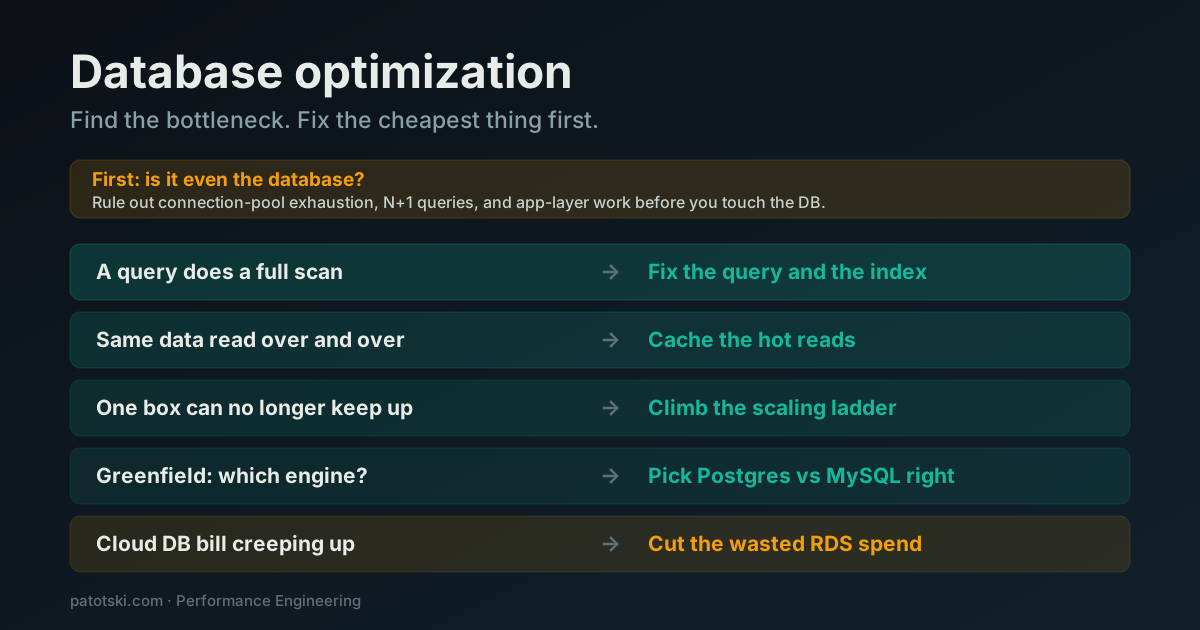
The scaling ladder is the branch you climb once one machine is the limit. To work out whether scaling is even the right problem, start at database optimization: find the bottleneck, fix the cheapest thing first.
Staring at a scaling decision and not sure which rung you are actually on? That diagnosis is the first thing I do in Performance Engineering. Book a free 30-minute call and we will find the real bottleneck before you commit to the expensive fix. Or hire me ongoing as your fractional CTO.