 Viktar Patotski ·
· security
· 10 min read
Viktar Patotski ·
· security
· 10 min read
Database Encryption at Rest: What Protects You vs What Checks a Box
Turning on RDS encryption satisfies the compliance question and stops almost none of the attacks that actually leak data. Here is what each layer of encryption at rest really defends against, on Postgres and AWS, and how to build the one that protects the sensitive field.
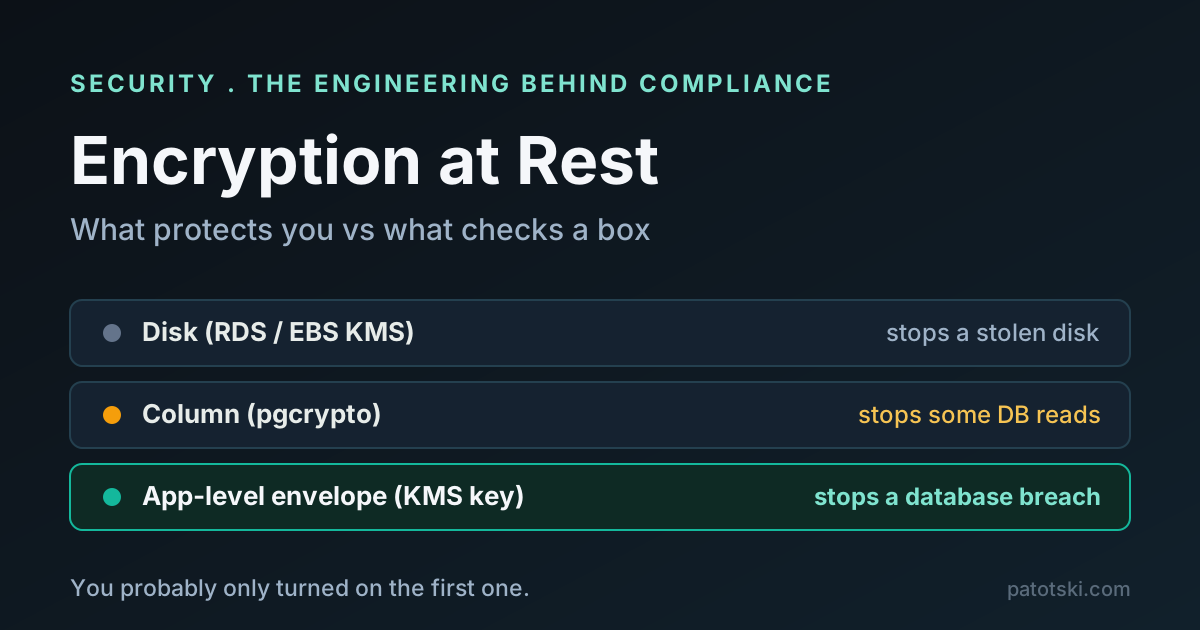
“Is your data encrypted at rest?” You tick the box, because RDS encryption is on. The auditor is satisfied, the security questionnaire is green, and the sensitive data in your database is still one leaked query away from plaintext.
Encryption at rest is not one thing. It is three or four different controls that defend against different attacks, and the easy one, full-disk encryption, defends against the attack you are least likely to suffer. This is how to tell the layers apart and build the one that actually protects the field you care about, on a Postgres and AWS stack.
Start with the only question that matters: which attack?
Encryption is not a magic property that makes data “safe.” It defends against a specific attacker in a specific position. So before choosing a mechanism, name the threat:
- Someone steals the physical disk, or a decommissioned drive, or a raw storage snapshot.
- Someone compromises your application (SQL injection, a leaked deploy, RCE).
- Someone steals a database credential and connects.
- An insider or DBA with legitimate database access reads the data.
- The data leaks through a copy: a restored backup, an export, a log line.
Each layer of at-rest encryption answers some of these and is invisible to the rest. Match the layer to the threat, not to the checkbox.
Layer 1: disk encryption (RDS, EBS). The checkbox.
This is what “encryption at rest” usually means in practice. On AWS you turn on RDS encryption, it uses AES-256 on the host, and it encrypts the underlying storage plus logs, automated backups, read replicas, and snapshots, keyed by an AWS KMS key. It costs nothing and needs no code changes.
What it defends against: someone getting the physical storage. A stolen drive, a discarded disk, a raw snapshot restored by someone who does not hold the KMS key. For that attacker the bytes are ciphertext.
What it does not defend against: everything that reads through the running database. AWS is explicit that the decryption is transparent and needs no application change: in its own words, “you don’t need to modify your database client applications to use encryption.” That is the tell. The database process, and the OS underneath it, handle plaintext; the ciphertext only exists at the storage layer. So if a compromised app, a stolen credential, or a rogue DBA can run a query, disk encryption hands them plaintext. It was never in that path.
Two operational notes that bite people:
- You cannot encrypt an existing RDS instance in place. You snapshot it, copy the snapshot specifying a KMS key (the copy is encrypted), and restore from the encrypted copy. Plan the cutover.
- Aurora now encrypts new clusters by default (for clusters created on or after 2026-02-18, using an AWS owned key). Verify the state of your own clusters rather than assuming.
Turn disk encryption on for everything. It is free and it closes a real hole. Just do not confuse it with protecting the data from a live attacker.
The gap disk encryption leaves
Every breach that makes the news is the second category, not the first. Nobody mails you the stolen server. They pop the app, phish a credential, or find an over-permissioned service account, and then they query. Against all of those, Layer 1 is transparent. If the sensitive field must survive a database compromise, the encryption has to live closer to the data or closer to the app, with the key out of reach of whoever holds the database.
Layer 2: column encryption in Postgres (pgcrypto)
Postgres ships pgcrypto, which encrypts individual fields with functions like
pgp_sym_encrypt. Only the sensitive columns are ciphertext; the rest of the row
is normal. That sounds like the answer, and for some cases it is, but read the
limitations, because they are in the Postgres manual for a reason:
- The key travels in the SQL statement.
pgcryptoruns inside the server, so you pass the key as a query parameter and the plaintext plus the key move through the server in the clear. Anywhere the query text is retained (statement logs, activity views, a proxy) can capture the key. The Postgres docs are blunt that if you cannot trust the server and admins, you should do the crypto in the client instead. - No indexing or search. You cannot meaningfully index, range-query, or join on an encrypted column. Encrypt a field you filter on and you have thrown away the query planner.
- No side-channel resistance, per the manual.
pgcrypto fits a narrow spot: a field you only ever read whole, on a server and
connection you trust, when you cannot change the application. For the crown-jewel
fields, the key-in-the-query problem usually pushes you one layer further out.
Layer 3: application-level (envelope) encryption. The one that protects.
Encrypt the field in your application before it ever reaches the database, with a key the database has no access to. Now the database and the OS store only ciphertext, and reading plaintext requires a separate permission: access to the key in your KMS, which is a different IAM grant from database access. A dumped table, a stolen snapshot, a rogue DBA, a leaked credential: all of them get ciphertext.
The standard pattern is envelope encryption, and AWS KMS is built for it:
- A key encryption key (KEK) lives in KMS and never leaves it.
- You call
GenerateDataKey, which returns a fresh data encryption key (DEK) both in plaintext and wrapped under the KEK. - You encrypt the field locally with the plaintext DEK, wipe it from memory, and store the wrapped DEK next to the ciphertext.
- To decrypt, you send the wrapped DEK back to KMS, get the plaintext DEK, use it, discard it.
In Java that is roughly:
// Encrypt one sensitive value with a KMS-managed data key (envelope encryption).
GenerateDataKeyResponse dk = kms.generateDataKey(b -> b
        .keyId(KEK_ARN)
        .keySpec(DataKeySpec.AES_256));

byte[] plaintextKey = dk.plaintext().asByteArray();
byte[] wrappedKey   = dk.ciphertextBlob().asByteArray(); // store this with the row

try {
    SecretKey key = new SecretKeySpec(plaintextKey, "AES");
    byte[] iv = new byte[12];
    SecureRandom.getInstanceStrong().nextBytes(iv);

    Cipher cipher = Cipher.getInstance("AES/GCM/NoPadding"); // authenticated mode
    cipher.init(Cipher.ENCRYPT_MODE, key, new GCMParameterSpec(128, iv));
    byte[] ciphertext = cipher.doFinal(ssn.getBytes(StandardCharsets.UTF_8));
    // persist: ciphertext + iv + wrappedKey
} finally {
    Arrays.fill(plaintextKey, (byte) 0); // do not leave the key in the heap
}
Use an authenticated mode (AES-256-GCM, as above) so tampering is detected, not just concealed. AWS also offers the Database Encryption SDK, which wraps this whole dance if you would rather not hand-roll it. The trade-off is the same one Layer 2 has: an encrypted field cannot be indexed or searched, so encrypt what is sensitive, not everything, and keep the fields you query on in the clear.
Put the three layers against the attacks side by side and the shape is obvious:
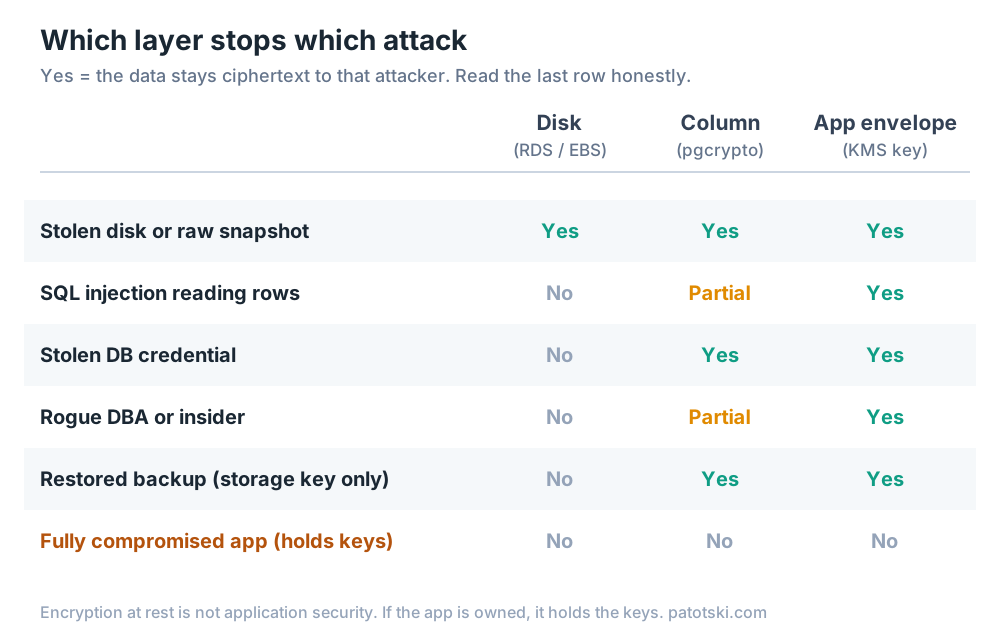
Disk encryption is a single Yes in a column of No. App-level envelope encryption is Yes down the line, right up to the honest floor: if the application itself is fully compromised, it holds the keys, and nothing you did at rest saves you. Encryption at rest is not a substitute for application security. It is the control that keeps a database breach from becoming a data breach.
”Why not just use Postgres TDE?”
Because as of Postgres 18 there is no transparent data encryption in core Postgres.
The options are the ones above plus OS-level disk encryption. There is a maintained
pg_tde extension from Percona that reached production readiness, but it requires
Percona’s patched Postgres build, not stock upstream, so it is not an option on RDS
or Aurora. Managed Postgres on AWS gives you Layer 1 (KMS storage encryption) and
leaves Layers 2 and 3 to you. Engine-native TDE on RDS exists only for Oracle and
SQL Server, not Postgres.
How to actually decide
- Do not store it if you do not need it. The cheapest encryption is the field you never keep. Minimize first.
- Turn on disk encryption (RDS/EBS KMS) everywhere. Free, closes the stolen-media hole, satisfies the baseline. Necessary, not sufficient.
- For the sensitive fields (PII, secrets, tokens, anything that would be a breach on its own), use application-level envelope encryption with the key in KMS, so database access and key access are separate permissions.
- Manage the keys like they matter. Keep keys separate from the data they protect, use a KEK/DEK hierarchy so you can rotate the wrapping key without re-encrypting everything, and set a rotation policy. NIST SP 800-57 and the OWASP Cryptographic Storage Cheat Sheet are the references worth reading.
- Reserve pgcrypto for the narrow trusted-server, read-whole, cannot-change-the-app case.
The honest one-line version: disk encryption protects you from a thief in the data center; application-level encryption protects you from a thief in your database. You almost certainly need the second one, and you probably only turned on the first.
What this control satisfies
Encryption at rest is a named or referenced control in the frameworks a SaaS gets asked about. This maps the engineering to the requirement it supports (it is engineering guidance on the control, not audit or certification advice):
| Framework | Where encryption at rest lands |
|---|---|
| SOC 2 (AICPA TSC) | CC6.1 (logical access), via its points of focus on encryption and protecting encryption keys |
| ISO/IEC 27001:2022 | Annex A 8.24, Use of cryptography (the 2022 control that consolidated 2013’s A.10.1.1 and A.10.1.2) |
| GDPR | Article 32(1)(a), which names encryption of personal data as an appropriate measure |
| HIPAA | 45 CFR 164.312(a)(2)(iv), an Addressable implementation specification |
| PCI DSS 4.0.1 | Requirement 3, rendering stored account data unreadable (3.5.1) |
One control, five frameworks. That is the leverage: building it once answers a column in every questionnaire. Note that SOC 2 and GDPR are risk-based, so they ask for encryption “where appropriate,” not as an absolute, and none of these is satisfied by disk encryption alone if the sensitive data is exposed to ordinary database access.
The takeaway
If you only remember one thing: encryption at rest is a threat-model decision, not a switch. Turn on disk encryption because it is free and it closes a real hole. Then ask which of your fields would be a breach on their own, and put those behind application-level envelope encryption with a key your database cannot reach. That is the difference between checking the box and being protected when, not if, someone gets a query into your database.
References
Primary sources behind the claims above (checked July 2026).
AWS
- Encrypting Amazon RDS resources
- AWS KMS best practices: data protection
- AWS KMS cryptographic details (envelope encryption)
- AWS KMS GenerateDataKey
PostgreSQL
Guidance and standards
- OWASP Cryptographic Storage Cheat Sheet
- OWASP Key Management Cheat Sheet
- NIST SP 800-57 Part 1 Rev. 5 (key management)
Framework controls
- ISO/IEC 27001:2022 Annex A 8.24, Use of cryptography
- GDPR Article 32, Security of processing
- HIPAA 45 CFR 164.312 (eCFR)
- AICPA 2017 Trust Services Criteria (2022 points of focus)
- PCI Security Standards document library
This is one control in a compliance-ready SaaS. If you are getting a product through a security review and want the engineering in order, hashing, encryption, tenant isolation, audit logging, that is what I do under Security and Compliance. Related on this site: Argon2 vs bcrypt vs scrypt, Postgres row-level security for multi-tenancy, and tenant data isolation.