 Viktar Patotski ·
· security
· 10 min read
Viktar Patotski ·
· security
· 10 min read
Secrets Management on AWS: Parameter Store vs Secrets Manager vs Vault
Environment variables are where secrets go to leak. Here is how to get them out, what each store actually buys you (and costs), and how to wire it into a Spring app without calling an API on every request.
Your database password is in an environment variable. Maybe a .env file, maybe
committed straight into application.yml, maybe the deploy config. It works, so
it never got fixed, and it is one of the most common ways a SaaS leaks
credentials. GitGuardian counted 23.8 million
secrets leaked on public GitHub in 2024 alone, up 25% year on year, and 70% of the
ones leaked in 2022 were still valid two years later.
Getting secrets into a proper store is one of the cheapest security wins available, and the hardest part is choosing between the options without overbuying. This is the decision, on a Java/Spring + AWS stack, plus how to wire it in.
Why environment variables are the wrong home for a secret
The classic argument for config-in-env is the 12-Factor App: keep config out of the code so the repo could go public without leaking anything. That is a real benefit, and it is about avoiding accidental commits. It says nothing about what happens to that value at runtime, which is where secrets in env vars get exposed:
- Every child process your app spawns inherits the whole environment. A shell-out to ImageMagick now has your database password. That breaks least privilege.
- Crash handlers and error reporters routinely dump the full environment to logs. Now the secret is in your log aggregator, readable by anyone with log access.
- “Print the environment” is the first thing people reach for when debugging, so the value ends up in a terminal, a CI log, a support ticket.
- Access is untrackable. Nobody can tell you who read an env var or when.
Environment variables are a fine last-mile delivery mechanism (the secrets manager hands the app a value, and it lands in memory), but they are a bad store of record. The store should be encrypted, access-controlled, audited, and rotatable. That is what these services are for.
The only question that matters: what do you actually need?
Do not start from “which tool.” Start from what the secret requires, because the answer changes the cost by an order of magnitude:
- Just encrypted config that rarely changes? You need less than you think.
- Automatic rotation? That narrows it.
- Cross-region or cross-account? Narrows it more.
- Short-lived, dynamic credentials issued per request? Different tool entirely.
- Multi-cloud? Different tool again.
Here are the three real options on this stack, cheapest first.
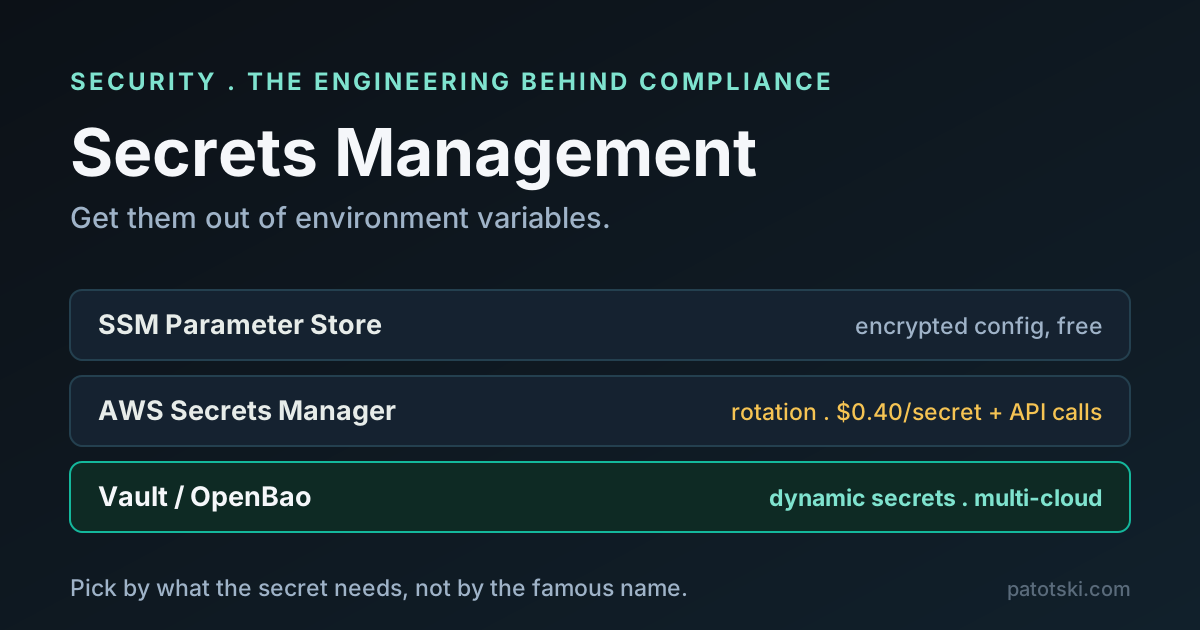
Option A: SSM Parameter Store (the one you probably start with)
AWS Systems Manager Parameter Store stores a SecureString encrypted with a KMS
key, and on the standard tier the storage and standard-throughput API access are
free. For encrypted configuration that does not need to rotate, that is the whole
job, at no cost beyond KMS. AWS itself calls SecureString the practical choice for
lightweight encrypted config that does not need rotation.
What you give up: no built-in rotation (parameter policies can warn you a value is stale, but they will not rotate it), a 4 KB value limit on standard (8 KB on the paid advanced tier), and no native cross-region replication. For a small AWS-native shop whose secrets are a database URL and a couple of API keys, none of that matters, and you have solved the problem for free.
Option B: AWS Secrets Manager (when you need rotation)
Secrets Manager is the same idea with the features Parameter Store lacks. Secrets are
KMS-encrypted and versioned with staging labels (AWSCURRENT, AWSPREVIOUS for
rollback, AWSPENDING during a rotation), so a rotation cuts over with no downtime.
It has built-in automatic rotation (managed for supported AWS databases, or a Lambda
function you control for anything else) and native cross-region replication.
It costs $0.40 per secret per month plus $0.05 per 10,000 API calls. That is nothing for ten secrets and real money for ten thousand, which is another reason to fetch at startup and cache rather than call the API per request (more on that below). Reach for Secrets Manager when a credential must rotate automatically, or must exist in multiple regions or accounts. For static config, Parameter Store already had you covered.
Option C: Vault or OpenBao (dynamic secrets, multi-cloud)
HashiCorp Vault is a different class of tool. Beyond versioned static key-value storage, its headline feature is dynamic secrets: instead of storing a database password, Vault generates a unique, short-lived credential per request, leased with a TTL and automatically revoked when the lease expires. A leaked credential is useless in an hour, and every service gets its own, which makes an audit trail trivial. It is also cloud-agnostic, so it is the answer when you are multi-cloud or need one control plane across providers. Its transit engine can even do encrypt/decrypt as a service (useful for the app-level encryption from the encryption-at-rest post).
The cost is operational and legal. Vault runs sealed and must be unsealed (delegate that to a cloud KMS with auto-unseal, but then Vault cannot start if that KMS is down), it runs active/standby for availability, and someone has to own that. On licensing: HashiCorp moved Vault to the Business Source License in August 2023, and IBM completed its acquisition of HashiCorp in February 2025. If BSL is a blocker, OpenBao is the MPL-2.0 fork under the Linux Foundation’s OpenSSF (GA July 2024). It is widely reported as an API-compatible drop-in from Vault’s last open-source release, though you should confirm that against your own version before betting on it.
Use Vault or OpenBao when you genuinely need dynamic secrets or multi-cloud. If you are a single-cloud shop that needs “encrypted, rotatable secrets,” the AWS options are far less to operate.
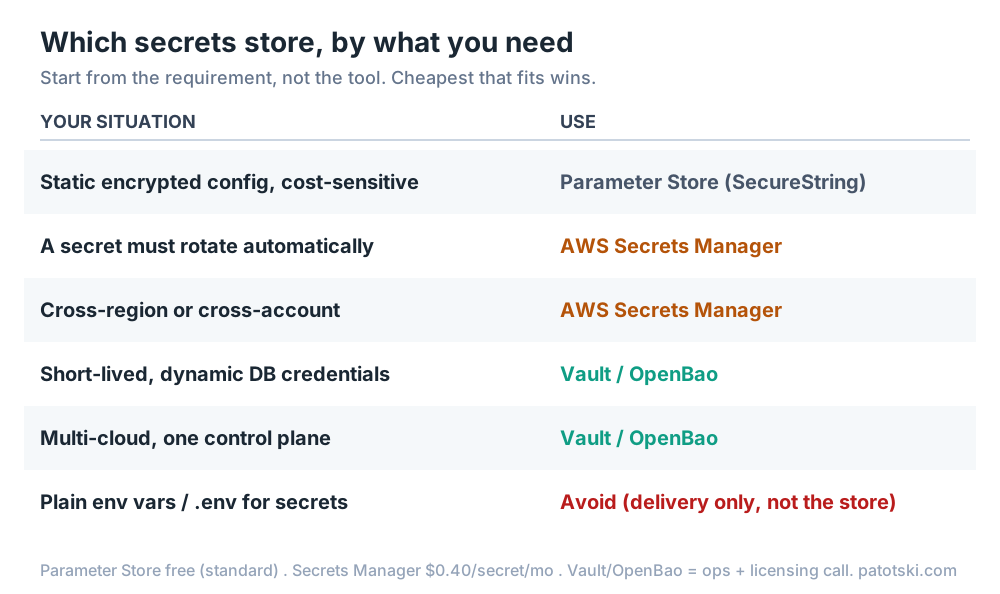
How to decide
The honest default for a Java/Spring shop on AWS: start with Parameter Store, move a secret to Secrets Manager the moment it needs rotation, and only stand up Vault when you have a real dynamic-secrets or multi-cloud requirement. Do not run Vault because it is the famous one.
Wiring it into Spring (without an API call per request)
Spring Cloud AWS 3.x pulls secrets in at application startup through
spring.config.import, so they become ordinary properties held in memory, not a call
on the request path. Add the starter
(io.awspring.cloud:spring-cloud-aws-starter-secrets-manager, versions managed by
the spring-cloud-aws-dependencies BOM) and:
spring:
  config:
    import: optional:aws-secretsmanager:/prod/myapp
Parameter Store is the same shape with aws-parameterstore:/prod/myapp. One caution:
the Spring Cloud AWS /current/ docs still serve the old 2.x artifact names, so pin
your examples to a 3.x doc version. For Vault, Spring Cloud Vault does the same via
spring-cloud-starter-vault-config and spring.config.import: vault://secret/myapp.
Fetch once at startup, cache in memory, and refresh on a schedule or a
/actuator/refresh rather than per read. That keeps both latency and the
per-API-call bill down.
The chicken-and-egg: secret zero
Every secrets manager has the same first problem: how does the app authenticate to it without a hardcoded credential? That first credential is “secret zero,” and the answer is to not have one. On AWS, give the workload an identity the platform vouches for: an EC2 instance profile, an ECS task role, or on EKS, IAM Roles for Service Accounts (IRSA) or the newer EKS Pod Identity, where the pod’s service-account token is exchanged with STS for temporary IAM credentials. Vault has the equivalent through its AWS and Kubernetes auth methods, or AppRole where the role ID and secret ID arrive over separate channels. The rule: the workload proves who it is with a platform-issued identity, and the secrets manager hands over the rest. Nothing is hardcoded.
If you are on Kubernetes
Two things surprise people. First, a Kubernetes Secret is only base64-encoded, not encrypted; the Kubernetes docs say so plainly, and anyone with API or etcd access can read it. Second, etcd stores those Secrets unencrypted at rest by default until you configure encryption with a KMS provider (use KMS v2; v1 is deprecated).
So on Kubernetes, do not treat native Secrets as your store of record. Keep the secrets in Secrets Manager, Parameter Store, or Vault, and pull them in with the External Secrets Operator (syncs an external store into k8s Secrets) or the Secrets Store CSI Driver (mounts them as a volume). If you want secrets you can safely commit to a GitOps repo, Sealed Secrets encrypts them so only an in-cluster controller can decrypt. And turn on etcd encryption at rest regardless.
Prefer mounting secrets as a file (the Secrets Store CSI Driver or a projected volume) over injecting them as environment variables. Env-var injection on Kubernetes inherits the same runtime exposures listed above: child processes inherit the whole environment, and crash handlers dump it to logs. A mounted file avoids both and can be permission-scoped to the process that needs it.
Keep them out of git in the first place
The best-managed secret still leaks if someone commits it. Add a secret scanner to the path: git-secrets or gitleaks as a pre-commit hook and CI step, TruffleHog when you want detected secrets actually verified against the provider, and turn on GitHub push protection so a detected secret blocks the push before it ever lands. Rotate anything that does leak immediately; assume a secret that touched a public repo is already compromised.
What this control satisfies
Getting secrets into a managed, encrypted, access-controlled store maps to the credential-and-key controls the frameworks care about (engineering guidance on the control, not audit or certification advice):
| Framework | Where secrets management lands |
|---|---|
| SOC 2 (AICPA TSC) | CC6.1, which explicitly covers protecting encryption keys and managing credentials; plus CC6.2 (credential lifecycle) and CC6.3 (least privilege over access) |
| ISO/IEC 27001:2022 | Annex A 5.17 Authentication information (the primary secrets control), A.8.24 Use of cryptography (key management), A.8.9 Configuration management |
| GDPR | Article 32, security of processing; encryption is only as strong as the keys and credentials guarding it |
Note the common mistake: the “protect encryption keys” language is a point of focus under SOC 2 CC6.1, not CC6.3. CC6.3 is about least-privilege access. Both apply to secrets, for different reasons.
The takeaway
Move secrets out of environment variables into a store that encrypts, controls access, audits, and rotates. On AWS, that is Parameter Store until a secret needs rotation, then Secrets Manager; Vault or OpenBao when you truly need dynamic credentials or multi-cloud. Give the workload a platform identity so there is no secret zero, cache at startup so you are not paying per request, and put a scanner in front of git so the whole effort is not undone by one commit.
References
Primary sources behind the claims above (checked July 2026).
AWS
- AWS Secrets Manager User Guide
- Secrets Manager rotation
- Secrets Manager pricing
- SSM Parameter Store
- Choosing between Secrets Manager and Parameter Store
- IAM Roles for Service Accounts (IRSA)
Vault / OpenBao
- Vault database secrets engine (dynamic secrets)
- HashiCorp BSL license change
- IBM completes HashiCorp acquisition
- OpenBao
Spring / Kubernetes
- Spring Cloud AWS reference (3.x)
- Spring Cloud Vault
- Kubernetes Secrets
- Encrypting Kubernetes data at rest
Guidance
This is one control in a compliance-ready SaaS. If you are getting a product through a security review and want the engineering in order, this is what I do under Security and Compliance. Related on this site: database encryption at rest and Argon2 vs bcrypt vs scrypt.