 Viktar Patotski ·
· Cloud & Cost
· 10 min read
Viktar Patotski ·
· Cloud & Cost
· 10 min read
AWS Savings Plans vs Reserved Instances: Which One Actually Cuts Your Bill
Both trade a commitment for a discount, but they are not interchangeable. Savings Plans buy flexibility, Reserved Instances buy the deepest rate, and the data tier plays by its own rules. Here is how to pick without locking up capital you will regret.
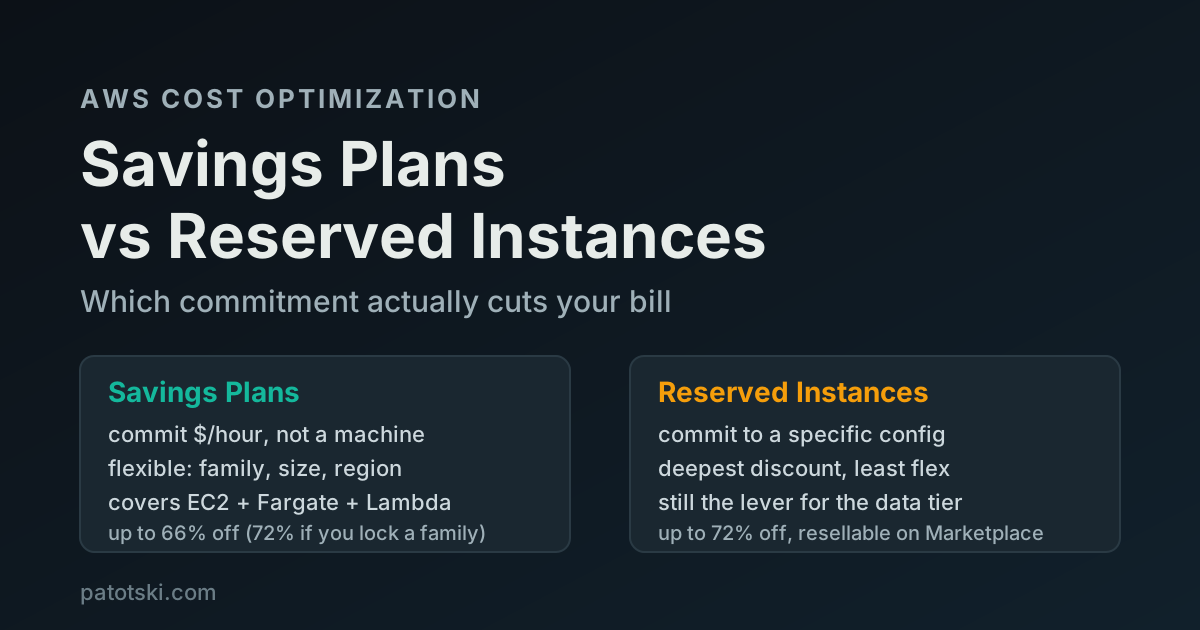
TL;DR - On-Demand is the most expensive way to run anything you run all the time. Both Savings Plans and Reserved Instances give you a lower rate in exchange for a 1 or 3 year commitment. The difference is what you commit to:
- Savings Plans commit you to a dollars-per-hour of compute spend. They flex across instance family, size, region, and even Fargate and Lambda. Up to 66% off On-Demand, or up to 72% if you lock to one instance family.
- Reserved Instances commit you to a specific configuration. Less flexible, but Standard RIs hit the deepest discount and you can resell them on the Marketplace if your needs change.
- The data tier is separate. Savings Plans never touched RDS, ElastiCache, or Redshift. As of December 2025, the new Database Savings Plans cover most of the data services, but Reserved Instances are still the lever for Redshift and OpenSearch.
Pick Savings Plans when your compute moves around. Pick Standard RIs when a workload has not changed in 18 months and you want the last few percent. Most mature accounts run both.
The trade is always the same: commitment for a discount
If a workload runs 24/7, paying On-Demand for it is the single most common line of waste in an AWS bill. On-Demand is the no-commitment rate. It is priced for the convenience of walking away at any second, and that convenience is expensive.
Both Savings Plans and Reserved Instances remove that premium. You tell AWS you will keep spending for one or three years, and AWS gives you a lower rate. That part is identical. Everything else, the discount depth, the flexibility, the exit options, comes down to what exactly you are promising to keep buying.
What you are actually committing to
This is the whole decision in one picture. A Savings Plan commits you to a rate of spend. A Reserved Instance commits you to a thing.
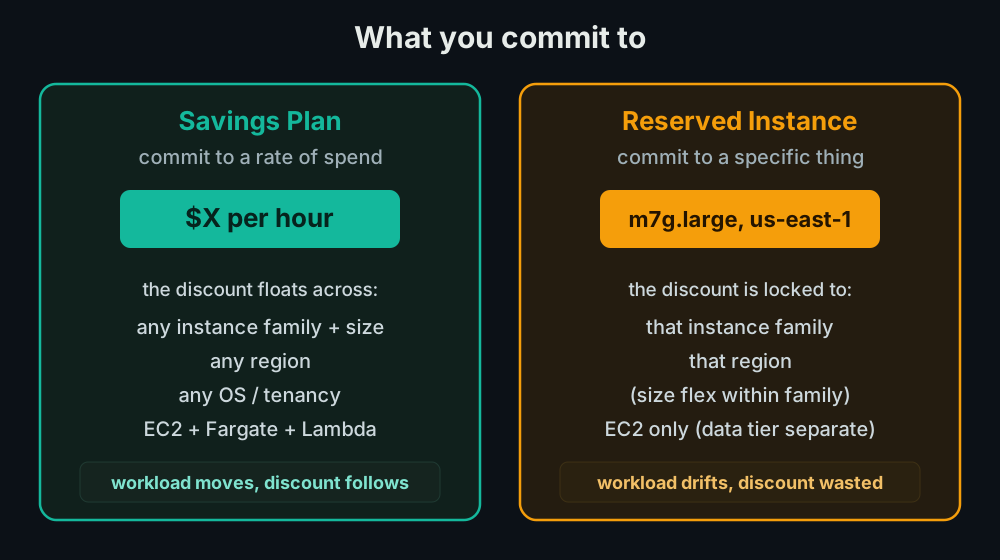
Because a Savings Plan is just a spend commitment, your discount follows your
workload. Move from m6i.large to m7g.xlarge, shift a service from EC2 to
Fargate, fail over to another region: the committed rate keeps applying as
long as you are still spending the dollars-per-hour you promised. A Reserved
Instance does not move. It is matched to a configuration, and if your usage
drifts away from that configuration the reservation sits there earning you
nothing.
Savings Plans: two flavors
There are two compute Savings Plans, and the difference between them is the classic flexibility-versus-discount trade.
Compute Savings Plans are the flexible one. Up to 66% off On-Demand, and the discount applies automatically across any instance family, any size, any region, any OS or tenancy, and to Fargate and Lambda usage on top of EC2. This is the same flexibility profile as a Convertible RI, without the manual exchange dance. If your architecture changes more than once a quarter, this is the safe default.
EC2 Instance Savings Plans trade that flexibility for depth. Up to 72%
off, but you commit to one instance family in one region (for example,
m7g in us-east-1). Within that box you still flex across size, OS, and
tenancy. This is the same discount as a Standard RI. Use it for the workloads
you are confident will stay on a given family in a given region.
There is also a SageMaker Savings Plan for ML workloads, which is its own product and out of scope here.
Reserved Instances: still useful, especially for data
Reserved Instances predate Savings Plans and AWS kept them around because they do two things Savings Plans do not.
Standard RIs give the deepest discount (up to 72%) and, critically, you can sell an unwanted one on the Reserved Instance Marketplace. That is a real exit hatch a Savings Plan does not have. A Savings Plan cannot be cancelled or sold for the length of its term. If you over-commit a 3 year Savings Plan, you pay for all three years no matter what.
Convertible RIs can be exchanged for a different configuration during the term, but you do the exchange manually. For most teams a Compute Savings Plan does the same job with less paperwork, so Convertible RIs see little use today.
The place RIs are not optional is the data tier. For years, Savings Plans covered only EC2, Fargate, and Lambda. They never applied to RDS, Aurora, ElastiCache, Redshift, or OpenSearch. The only commitment discount for those was a Reserved Instance (or Reserved Node). If you have a big managed-database bill and you only bought compute Savings Plans, the entire data half of your bill is sitting at On-Demand.
The 2025 change: Database Savings Plans
At re:Invent 2025, on December 2, AWS launched Database Savings Plans, and
they change the old advice. They bring the flexible Savings Plan model to the
data tier: you commit to a dollars-per-hour of database spend and the discount
floats across engine, instance family, size, deployment option, and region.
You can move an Aurora workload from db.r7g to db.r8g, shift it from
Ireland to Ohio, or modernize from RDS for Oracle to Aurora PostgreSQL, and
the discount keeps applying.
What they cover: Aurora, RDS, DynamoDB, ElastiCache, DocumentDB, Neptune, Keyspaces, Timestream, and DMS. They are 1 year term, No Upfront only. The discount depends on the deployment type rather than the engine:
- Serverless deployments: up to 35% off On-Demand.
- Provisioned instances: up to 20% off.
- DynamoDB and Keyspaces on-demand throughput: up to 18% off (provisioned capacity up to 12%).
Where you still reach for Reserved Instances or Reserved Nodes:
- Redshift. Not covered by Database Savings Plans. Redshift Reserved Instances remain the only commitment discount for it.
- OpenSearch. Not in the covered list either. Reserved Instances still apply there.
One important rule: a Database Savings Plan and an RDS Reserved Instance (or DynamoDB reserved capacity) will not both discount the same workload. Pick one per workload, do not double-buy expecting them to stack.
Payment options: upfront buys a little more
Whichever you choose, you pick how you pay, and it nudges the discount:
| Payment option | What it means | Effect on rate |
|---|---|---|
| All Upfront | Pay the whole term now | Best rate |
| Partial Upfront | Half now, the rest billed monthly | A point or two less |
| No Upfront | Nothing now, billed monthly | A few points less again |
The gap between All Upfront and No Upfront is small, usually a few percentage points. For most teams, No Upfront is the right call: you keep the cash, you keep nearly the same discount, and you do not tie up capital in a prepayment to AWS. Reach for All Upfront only when you have idle cash and want the last sliver of savings.
How to actually choose
Here is the decision the way I run it on a real account.
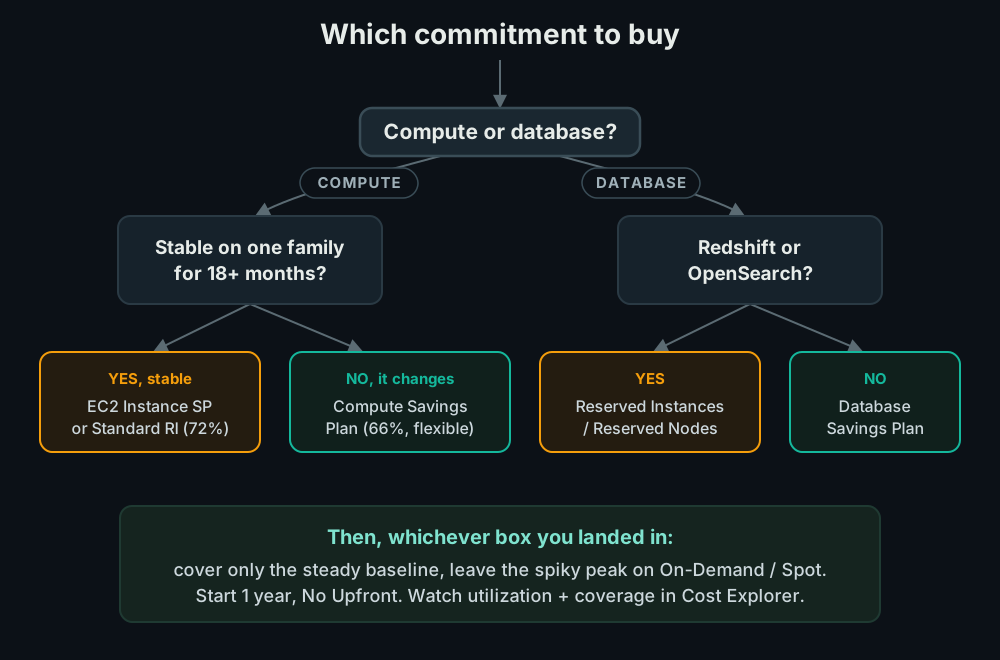
- Compute or database? Different products. Do the two halves separately.
- Is the workload stable? If a service has run on the same instance family in the same region for 18 months and you expect that to continue, the deepest rate (EC2 Instance Savings Plan or Standard RI) is worth the lock-in. If your stack changes often, take a Compute Savings Plan and keep the flexibility.
- Cover the baseline, not the peak. Look at your usage graph and find the floor: the amount of compute you are always running. Commit to that. Leave the spiky top on On-Demand or Spot. The classic mistake is committing to your average or your peak, then paying for a commitment you do not use on quiet days.
- Start at 1 year, No Upfront. Lower risk while you learn your real baseline. Step up to 3 year only on the workloads you are certain about.
The traps that cost real money
Over-committing. A Savings Plan cannot be cancelled or sold once it is locked in. (AWS allows a return only within 7 days of purchase, only in the same calendar month, and only for small plans of $100/hour commitment or less. After that you are in for the full term.) If you commit to $10/hour and your usage drops to $7/hour, you still pay for $10. Commit to the floor of your usage, not the average. This is the single most expensive mistake, because the whole point of the commitment evaporates the moment it exceeds what you run.
Forgetting the data tier. Teams buy compute Savings Plans, see the coverage number climb, and assume they are done. The RDS and ElastiCache bill is a separate world. Check it separately, and decide between Database Savings Plans and Reserved Instances for it.
Buying for capacity. A Savings Plan is a billing construct, not a capacity guarantee. It does not reserve hardware. If you need a guarantee that capacity will be there, that is an On-Demand Capacity Reservation, and your Savings Plan discount applies on top of it. Do not buy a Savings Plan expecting it to hold capacity for you.
Ignoring the two numbers in Cost Explorer. AWS gives you a utilization metric (how much of your commitment you are using, which should be near 100%) and a coverage metric (how much of your eligible usage is under a commitment). Low utilization means you over-bought. Low coverage means you are leaving discount on the table. Both live in Cost Explorer’s Savings Plans and Reserved Instances reports. If you are not looking at them monthly, you are flying blind.
Do the math (illustrative)
Say you run a steady baseline of EC2 that costs $10,000/month at On-Demand. The numbers below use realistic mid-range discounts (roughly 45% for the flexible plan, 60% for the locked one), not the headline maximums, which only land on specific instance types under 3 year All Upfront. Your real rates depend on instance type, region, and term, so treat this as the shape, not a quote.
| Strategy | Rough monthly cost | Saved |
|---|---|---|
| On-Demand (no commitment) | $10,000 | baseline |
| Compute Savings Plan (flexible) | ~$5,500 | ~$4,500/mo |
| EC2 Instance SP / Standard RI | ~$4,000 | ~$6,000/mo |
The flexibility of a Compute Savings Plan costs you something here, roughly $1,500/month against the deepest rate. That is the price of being able to move instance families without losing the discount. For a fast-moving startup that is cheap insurance. For a workload that has not changed in two years, it is money left on the table. That is the whole decision in one row.
Summary
Savings Plans and Reserved Instances both swap a commitment for a discount. Savings Plans buy flexibility, Standard RIs buy the deepest rate, and the data tier is its own decision (Database Savings Plans since late 2025, Reserved Instances for Redshift and OpenSearch). Cover the steady baseline, leave the spikes on On-Demand, start at 1 year No Upfront, and watch utilization and coverage in Cost Explorer every month. Done right it is one of the highest-leverage afternoons you can spend on an AWS bill: a recurring 30 to 70 percent cut on the half of your spend that never changes.
This is one of several quiet AWS costs that compound. For the database side, see how to reduce AWS RDS costs without hurting performance, and for the network side, where AWS data transfer costs leak.
Want someone to size these commitments for your account? I do this as part of AWS Cost Optimization. Book a free 30-minute call and I will show you the baseline worth committing to.